Your Google listings, synced to Apple. Automatically.
Everything you manage on Google Business Profile through GMBapi, opening times, logo, photos, posts, and action links, now flows straight to Apple Business too. One workflow. Two ecosystems. Zero extra effort.
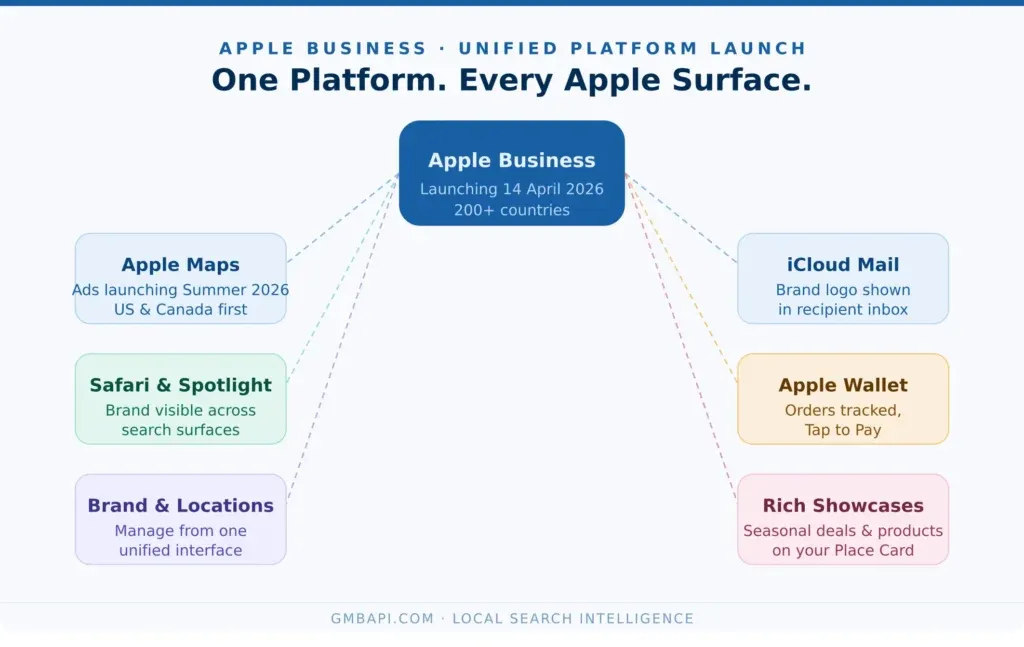
Apple Business launched on 14 April 2026.
Apple Business (formerly known as Apple Business Connect) launched in its current form on 14 April 2026. It's Apple's all-in-one platform for managing how your brand appears across Maps, Siri, Spotlight, Safari, and Mail. If your listings aren't there, you're invisible to over a billion Apple device users.
Why It Matters
Google isn't the only map your customers open.
Every iPhone, iPad, and Mac ships with Apple Maps as the default. Add Siri voice search, Safari Spotlight, and Apple's AI-powered local recommendations, and you're looking at a local search ecosystem reaching more than a billion devices worldwide.
In countries with the highest iPhone market share, the UK, Canada, Scandinavia, the US, and Japan, a significant share of your potential customers use Apple Maps as their primary navigation tool. Apple Business is often an afterthought for marketers focused on Google Business Profile, yet it generates an estimated 13% of the impressions and actions Google Maps generates on its own. That's a real volume of customers left on the table if your Apple Business listing is missing, incomplete, or unmanaged.
And it's only getting more important. Siri is expected to see a significant revamp in 2026, with advanced AI models built in. Businesses whose Apple Business listings are accurate, complete, and optimised will be the ones Siri actually surfaces when customers ask for local recommendations.
Apple Business gives you full control across all of those surfaces: rich place cards, custom action links, branded identity in Mail, and, coming this summer, paid ads on Apple Maps. Businesses that show up completely on Apple will have a clear edge over those that don't.
Managing Apple and Google separately used to mean double the work, two logins, two sets of updates, two platforms to maintain. GMBapi removes that. Manage your Google Business Profiles the way you always have, and let GMBapi push everything to Apple Business automatically.
The GMBapi Advantage
Not all Apple integrations are equal.
There's a real difference between an Apple OAuth API partner and a standard vendor or citation tool. Most platforms can only push basic business information- name, address, hours, and a description- to Apple Maps. That's the same level of access a citation tool had before Apple's own API existed.
As an official Apple API partner, a status that took eight to twelve months of qualification against Apple's data quality requirements, GMBapi has full access to the Apple Business API. That unlocks a different tier of management entirely.
What Gets Synced
Everything you update on Google is pushed to Apple.
When you update a location in GMBapi, the same changes go to your Apple Business listing. Here's what syncs:
Creation & Verification | We can create Apple Business Brands and sync all of your locations without any verification or action from you. |
Logo & Cover Photo | Your verified brand identity stays consistent across Google and Apple. When your logo appears in Apple’s branded Mail communications, it builds trust before a customer even opens the message. Only available through an API partner like GMBapi. |
Fresh Product Photos | Push new product or location images from GMBapi and have them appear across both platforms simultaneously. Keep your visuals fresh without manual uploads. |
Action Links | Custom calls-to-action like ‘Book’, ‘Order’, ‘Reserve’ and ‘Get a Quote’ are synced to your Apple Business listing, driving direct conversions from Apple Maps. |
Posts & Showcases | Publish offers or local content to the Apple ecosystem. Note: Apple reviews each post (up to 3 business days). Only one showcase can be active per location at a time. |
NAP Data | Name, address, and phone number remain consistent across Google and Apple. GMBapi flags discrepancies before they impact rankings or confuse customers. |
Categories & Attributes | Business categories, accessibility info, payment methods, and other attributes are mirrored across platforms for consistency. |
Opening Times | Update hours (regular, seasonal, or holiday) in bulk or per location. Changes sync instantly via app or by the next morning via GBP, preventing customer frustration. |
How It Works
Connect once. Sync forever.
There's no new workflow to learn. Setting up Apple Business in GMBapi takes under two minutes. Your path depends on whether you already have a managed Apple Business account.
If you already have an Apple Business account:
- Connect your Apple Business account via OAuth in your GMBapi settings. One click, done.
- Sync your locations. GMBapi automatically maps your existing GBP locations to their Apple counterparts, and surfaces and closes any gaps.
- Update as normal. Every edit, in GMBapi or directly in GBP, syncs to Apple automatically in the background, whether it's one location or ten thousand.
- Track performance. View Apple impressions, taps, and direction requests alongside your Google data in one report.
- Publish showcases. Publish offers or locally relevant content in the Apple ecosystem. Allow 3 business days for Apple’s review before a new showcase goes live.
If you do not yet have an Apple Business account:
- Create your brand. GMBapi needs you to create a brand per country, as these are the umbrellas your individual locations connect to in Apple Maps. You'll need country, categories, ownership type, location selection, website URL, and brand name.
- Sync your locations. GMBapi maps your GBP locations to create or match Apple counterparts, and flags any gaps.
- Allow time for Apple verification. This typically takes around two weeks. Once complete, you get full access to metrics, posting, and every management feature.
- Update as normal. From this point, every edit in GMBapi or directly in GBP syncs to Apple automatically.
- Track performance & publish showcases. Full reporting and showcase publishing are unlocked once Apple verification is complete.
GMBapi is already the only local SEO platform offering free, unlimited rank-tracking heatmaps for Google. Apple Business Integration brings that same no-credits, no-limits approach to the Apple ecosystem.
Full Feature Set
Not just a sync. A full Apple management layer.
GMBapi's Apple Business integration gives you a complete set of tools to manage, monitor, and report on your Apple presence:
- Bulk upload, verify, or update all your Apple listings in a single action
- Post on-brand content and photos to Apple listings at scale
- Unified reporting: Google and Apple performance in one exportable dashboard
- Developer API access for resellers and agencies building custom workflows
- Unlimited users and unlimited location edits, consistent with GMBapi's no-credits pricing model
Good to know: Apple Business vs Google Business Profile
Apple Business and Google Business Profile are complementary, not identical. GBP is the stronger platform for ongoing engagement and reputation management and is used as a source of truth. Apple Business excels at brand presentation and conversion within the Apple ecosystem. A few differences to be aware of:
⚠ Video uploads are not currently supported on Apple Business listings
⚠ Review management isn't available on Apple; no review responses or monitoring
⚠ Only one showcase (post) can be live per location at a time
⚠ New posts or showcases need up to 3 business days for Apple's review before going live
⚠ UTM tracking is supported on Flexible Action Links, but not on web links or standard action links
Who It's For
Built for everyone managing local search at scale.
Marketing Agencies | Push Apple updates for all your clients from one agency account. White-label reporting, bulk tools, and API access scale to the Apple ecosystem without adding headcount. |
Multi-Location Brands | Seasonal hours, new photography, updated action links, pushed to every location’s Apple listing in one go. No logging into 50 separate accounts. |
Franchise Networks | Enforce brand consistency across every franchisee’s Apple listing automatically. One change at the top, reflected everywhere below. |
Small Businesses | Set it up once and forget about it. GMBapi keeps your Apple listing as accurate and complete as your Google one, without any extra work from you. |
Resellers & White-Label | Add Apple Business Management to your service offering. Full API access means you can build it into your platform as if you built it yourself. |
The GMBapi Difference
Why manage Apple separately when you don't have to?
Most local SEO tools treat Google and Apple as separate products, separate tabs, separate workflows. GMBapi treats them as one. Your GBP listings are the single source of truth, synced across both ecosystems automatically.
Apple Business is often an afterthought for marketers focused on GBP management, despite generating an estimated 13% of the actions Google Maps generates on its own. That's a real volume of customer intent most businesses aren't capturing. GMBapi lets you carry your entire local SEO effort across the two largest map platforms, with no extra work required.
That's the product-led approach we've taken from day one: no credits, no feature gates, no surprises. It's why we've been recognised consistently as the Best Value Local SEO Software by G2 and Gartner.
What Customers Say
Used by agencies and brands across EMEA.
1 / 2
“GMBapi has completely changed how we handle local SEO for our clients. The bulk update tools alone save our team hours every week. Having Apple in the same workflow is exactly what we needed.”
Agency Director, London
Get Started
Available as an add-on to our Essential package.
Apple Business integration is available as an upgrade on GMBapi's Essential package. Talk to our sales team while we're working on a self-serve route for SMB customers.
Start your free GMBapi 14-day trial.
Get instant access to most features from day one, with setup support included; no credit card needed. Apple Business setup is completed only for paid customers who activate the citations module.
Everything you need to know about Apple Business.
Detailed answers covering the Apple Maps Business listing, what you can (and cannot) manage, how it works, and what GMBapi handles for you automatically.



Frequently Asked Questions
Getting Started
Nope, not needed. We can create it for you as part of onboarding.
It is your digital asset on Apple Maps, the equivalent of your Google Business Profile.
Your Apple Business listing surfaces across Apple Maps, Siri, Safari Spotlight, and, for verified brands, iCloud Mail. Every update pushed from GMBapi propagates across all of these automatically.
Apple Maps place cards are viewed billions of times every month. Users visit them to learn about a business, view photos and ratings, check hours, and take direct actions like ordering food or reserving a table. For any business with a physical presence, it’s not a nice-to-have; it’s a core discovery channel.
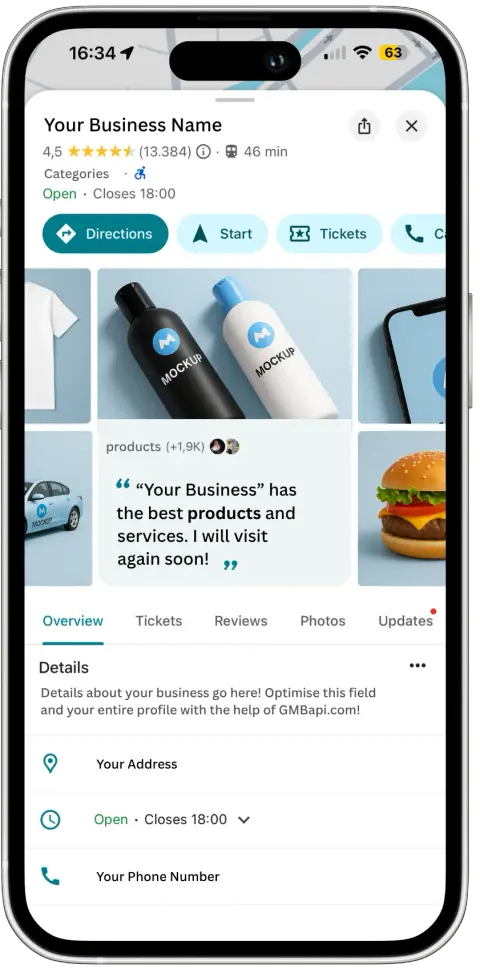
The place card is the full digital profile of your business inside Apple Maps. It shows your business name, address, hours, and phone number at the top, followed by an action row with clickable buttons, a photo gallery, a Showcase module for promotions, ‘About’ text, ‘Good to Know’ attributes, and service hours. GMBapi manages all of these sections for you.
This is one of Apple’s biggest practical advantages for multi-location businesses. Google requires every individual location to be verified separately, a time-consuming process at scale. Apple Business requires only a single company-level verification, which automatically covers all subordinate brands and locations. That said, the initial company verification can still take time, as some locations may be flagged for manual review by Apple. Once verified and matched, the process is typically more efficient than Google’s location-by-location model.
Connecting an existing Apple Business account to GMBapi takes under two minutes. If you’re creating a new Apple Business presence from scratch, allow approximately two weeks for Apple to complete the verification and matching of your brands, companies, and locations. Once complete, you gain full access to performance metrics, posting, and all management features.
The API Partner Advantage
A significant one. Standard vendors and citation tools can only push basic data to Apple: name, address, hours, and a description, essentially what a citation has always done. That gives you a listing, but not a managed, branded presence.
As an OAuth API Partner, Apple's designation for approved platforms that manage business data at scale, GMBapi can manage logos, cover photos, gallery images, action links, showcases, and bulk posting via API, and retrieve full performance data. This is the same access model used by Apple's own approved integration partners, and it took eight to twelve months of rigorous qualification to achieve.
Without API partner status, a business cannot add a company logo or cover photo to its Apple Maps place card. These are partner-only features. The logo in particular has an outsized impact: it appears in Apple's branded email communications (iCloud Mail) for verified businesses, building trust before a customer even opens your message. GMBapi's partner status is what makes all of this available to you.
Apple Business vs Google Business Profile
A significant one. Standard vendors and citation tools can only push basic data to Apple: name, address, hours, and a description, essentially what a citation has always done. That gives you a listing, but not a managed, branded presence.
As an OAuth API Partner, Apple's designation for approved platforms that manage business data at scale, GMBapi can manage logos, cover photos, gallery images, action links, showcases, and bulk posting via API, and retrieve full performance data. This is the same access model used by Apple's own approved integration partners, and it took eight to twelve months of rigorous qualification to achieve.
Deep ecosystem integration. Your verified Apple Business profile doesn't just appear on Maps; your logo surfaces in iCloud Mail, your listing is surfaced by Siri for voice queries, and your action links reach users inside the apps they already use throughout the day. Apple's ecosystem is uniquely cohesive in a way Google's isn't.
Apple Business is a powerful platform, but there are a few differences to know about upfront:
Video uploads are not currently supported on Apple Business listings.
Review management is not available on Apple; you cannot respond to or monitor reviews via the Apple ecosystem.
Only one showcase (post) can be live per location at a time.
New showcases require up to 3 business days for Apple's review before going live; plan your scheduling accordingly.
UTM tracking is supported on Flexible Action Links, but not on standard web links or action links.
Cover Photo & Logo
You can set a cover photo at the brand level (applies to all locations) or at the individual location level. When both are set, the location-level photo takes precedence. GMBapi lets you manage both, push a brand-wide cover in one action, then override it for specific locations where needed.
Yes, Apple requires both to be provided as a set. They appear together at the top of the place card. If logos are present, your action links will also display your branding rather than a generic Safari icon. GMBapi syncs both from your Google Business Profile assets.
Yes. GMBapi supports location-level photo management, so you can push different cover photos to individual locations while keeping a brand-wide default in place for any that don't have their own.
Gallery Photos
Apple automatically organises your photos into albums when you've supplied enough of each type. Supported album types include Atmosphere, Exterior, Food & Drink, Menu, and more. Best practice is to supply several photos per album type. Users can tap any photo to expand it to full screen.
Photos drive the highest level of user engagement of any place card element, according to Apple's own documentation. They're the primary way to attract new customers and keep your listing competitive against nearby businesses. GMBapi pushes your product and location photos to Apple at the same time as Google, so your visual presence is always current on both platforms without any extra effort.
Action Links
Action links are tappable buttons in the action row on the place card, sitting next to Apple's three default buttons: Directions, Call, and Website. They let users take direct action, Order Food, View Menu, Reserve a Table, Book an Appointment, without leaving Apple Maps. Your preferred call to action appears in the fourth button position. Additional actions appear under a 'More' button.
There are two main types available through the GMBapi integration. Quicklinks are universal links that deep-link into your iOS app (the app must be available on the App Store). Flexible Action Links (FALs) work the same way but link to your website instead, so no iOS app is required. FALs also support UTM parameters (utm_source, utm_medium, utm_campaign, utm_term, utm_content) so you can track exactly how much traffic is coming from Apple Maps in your analytics. A third type, App Clips, is not yet available via API.
Yes, via UTM parameters on Flexible Action Links. You can use values like utm_source=apple_maps and utm_campaign=summer_promo to measure visitors arriving from your place card. Standard tracking tokens, GCLID parameters, and login trackers are not permitted under Apple's privacy guidelines.
Yes. A location can have multiple action links, but only one can be set as the preferred call to action (the fourth button position). Additional links appear under the 'More' dropdown. Only one flexible action link is allowed per action type per location — so one 'Order' link, one 'Reserve' link, and so on.
Showcases
A Showcase is a promotional module on your Apple Maps place card that lets you highlight an offer, announce an event, or feature a new product. Each showcase contains a headline, body text, a single image, and a call-to-action button. It sits prominently on the place card, just below the photo gallery, making it one of the highest-visibility spots on your entire Apple listing.
A showcase can run for between 1 and 365 calendar days. It always starts at midnight and ends at 11:59 p.m. on the final day. You can schedule multiple showcases in advance, but only one can be active per location at any time. You can also deactivate a showcase early; useful if you sell out of a promoted item.
Apple requires showcases to be submitted at least 3 business days before the start date so they can be reviewed and approved. This is an important difference from Google, where posts go live almost instantly after an automated AI check. GMBapi handles submission on your behalf and will flag any scheduling issues before they become a problem.
Showcases are currently supported in 38 countries. If you're managing locations across multiple markets, GMBapi will flag which locations are eligible and ensure showcases are only submitted for supported territories.
Opening Hours & Service Hours
Yes. Apple Maps supports service hours and separate opening times for different departments or services within a single location. For example, a supermarket can show different hours for its pharmacy, bakery, and garden centre. GMBapi syncs these from your GBP data where available, and lets you set Apple-specific service hours for departments that exist on Apple but not on Google.
Apple supports special hours for temporary adjustments to regular trading times, bank holidays, seasonal closures, extended Christmas hours, and so on. These should be submitted at least 5 business days before they take effect. GMBapi pushes special hours to Apple at the same time as Google, so customers always see accurate hours across both platforms, no matter the time of year.
About, Good to Know & Attributes
The About section is a free-text area where you describe what makes your location special. It supports multiple languages; Apple Maps automatically displays the version that matches the user's device language. GMBapi syncs your About text across Google and Apple, and lets you write Apple-specific descriptions where you want to differentiate the messaging.
Good to Know is a section on the place card that lists amenities and services available at the location, things like wheelchair access, outdoor seating, free Wi-Fi, parking, payment methods, and more. These attributes come from both your GMBapi data and other Apple data providers. Keeping them accurate and complete improves your listing's relevance in local search and Siri queries.
Brand Structure & Location Management
Apple's system requires you to create a brand per country. Each brand acts as an umbrella for all the individual locations within that country. For example, a retail chain operating in the UK and Germany would have a separate Apple brand for each. When setting up a brand, you'll define: country, business categories, ownership type, location selection, website URL, and brand name. GMBapi walks you through this process and handles the technical side of connecting locations to the right brand segment.
New GBP locations need to be assigned to the corresponding Apple brand segment before data can be pushed to Apple. GMBapi surfaces these gaps automatically and flags locations that haven't been matched yet. We're working towards making this fully automated. For now, our team manages brand segment assignments to ensure accuracy and avoid mismatches during early rollout.
Agencies, Resellers & Multi-Location Management
Apple's system uses a Delegation or OAuth model: your client shares access to their Apple Business account with GMBapi as a trusted partner. Once that's in place, GMBapi can manage cover photos, logos, action links, showcases, and all listing data on their behalf, without the client needing to stay involved in day-to-day updates. This is the same access model used by Apple's own approved integration partners.
Yes. GMBapi's agency and reseller tiers support unlimited client accounts, unlimited locations, and unlimited users. Bulk update tools let you push changes across an entire client portfolio in a single action, and white-label reporting means you can present Apple + Google performance data under your own brand.
GMBapi's listing health monitoring flags display issues, data discrepancies, and suppressed listings automatically. For issues that need to be escalated to Apple directly, GMBapi provides the structured reporting format Apple requires, making it fast to submit corrections through Apple's Data Support channel.
Apple Business Ads on Maps
Apple announced a new paid advertising product inside Apple Maps, launching in the US and Canada in the summer of 2026 as part of the Apple Business platform. Ads will allow businesses to be prominently featured in map search results for relevant local queries, effectively Apple's answer to Google Local Services Ads. GMBapi will support Apple Maps Ads management as the feature rolls out globally.
No. Apple Business Integration is available as an add-on to GMBapi's Essential package. Talk to our sales team to get set up.
Start growing with GMBapi
Leverage AI to manage reviews, bulk publish content while ensuring consistency across all your local platforms. Stay ahead by monitoring competitors & showcasing what makes you stand out.
Our Transparent Pricing
EXPLORE PLANSHow Our Clients Keep Winning
SUCCESS STORIESHave any questions?
Contact us about pricing, larger rollouts, or the Partner API. We reply within 24 hours.
Trusted By

%20--%3e%3csvg%20version='1.1'%20id='Layer_1'%20xmlns='http://www.w3.org/2000/svg'%20xmlns:xlink='http://www.w3.org/1999/xlink'%20x='0px'%20y='0px'%20viewBox='0%200%20229%2033'%20style='enable-background:new%200%200%20229%2033;'%20xml:space='preserve'%3e%3cstyle%20type='text/css'%3e%20.st0{fill-rule:evenodd;clip-rule:evenodd;fill:%23ffffff;}%20.st1{fill:%23ffffff;}%20%3c/style%3e%3cg%3e%3cg%3e%3cpath%20class='st0'%20d='M166.4,6c0.1-2.2-1.7-3.2-3.7-2.8c-1.8,0.3-3.6,1.9-5,3.4v0c-0.5,0.6-1,0-1,0l0,0c-1.4-1.5-3.2-3.1-5-3.4%20c-1.9-0.4-3.7,0.6-3.7,2.8c0.1,3.9,4.8,3.9,7.7,2.4c-2.1,1.9-4.3,4.4-6.2,3.4c0,0,0,0-0.1-0.1c0.4-0.1,0.6-0.4,0.6-0.8%20c0-0.4-0.4-0.7-0.8-0.7c-0.4,0-0.7,0.4-0.7,0.9c0,0.2,0.1,0.3,0.2,0.4h0c2.7,2.9,6.3-1.5,8.3-3.8c0,0,0.1,0,0.1,0c0,0,0.1,0,0.1,0%20c2,2.3,5.6,6.8,8.3,3.9h0c0.1-0.1,0.2-0.3,0.2-0.4c0-0.4-0.3-0.8-0.7-0.9c-0.4,0-0.8,0.3-0.8,0.7c0,0.4,0.2,0.7,0.6,0.8%20c0,0-0.1,0.1-0.1,0.1c-1.9,1-4.1-1.4-6.2-3.4C161.6,9.9,166.3,9.9,166.4,6z%20M150.6,7.5c-3.1-2,0.5-6.8,6.3-0.2%20C156.9,7.3,153.7,9.4,150.6,7.5z%20M157.6,7.3c5.7-6.6,9.3-1.7,6.3,0.2C160.8,9.4,157.6,7.3,157.6,7.3z'/%3e%3c/g%3e%3cg%3e%3cpath%20class='st1'%20d='M0,0.7V0h3.7v17.9h0.1c1.1-2.1,3.4-4.5,6.6-4.5c4.7,0,6,2.4,6,5v14.1h-3.7V17.3c0-2.4-1.2-3.2-2.6-3.2%20c-3.7,0-5.6,3.7-6.4,5.2v13.2H0V0.7z'/%3e%3cpath%20class='st1'%20d='M24.7,14.1v-0.7h3.7v15.8c0,1.9,1.1,3.1,2.7,3.1c3.1,0,5.8-3.5,5.8-6.8V14.1v-0.7h3.7v19.1H37v-4h-0.1%20c-0.4,1-2.2,4.6-6.2,4.6c-4.4,0-6-2.3-6-4.9V14.1z'/%3e%3cpath%20class='st1'%20d='M49,15.1v-1.7h3.7v4.5h0.1c1.1-2.1,3.3-4.5,6.6-4.5c4.7,0,6,2.4,6,5v14.1h-3.7V17.3c0-2.4-1.2-3.2-2.6-3.2%20c-3.7,0-5.6,3.7-6.4,5.2v13.2H49V15.1z'/%3e%3c/g%3e%3cpolygon%20class='st1'%20points='72.1,0%2075.8,0%2075.8,24.6%2086.4,14.4%2087.7,14.4%2080.1,21.5%2088.9,32.5%2084.1,32.5%2077.4,24.1%2075.8,25.6%2075.8,32.5%2072.1,32.5%20'/%3e%3cg%3e%3cpath%20class='st1'%20d='M96.2,25.6c0,3.1,0.4,6.7,4.5,6.7c3.7,0,6.4-2.5,7-6.1h0.7c-0.7,4.1-3.7,6.8-7.8,6.8c-5.2,0-8.8-4-8.8-9.8%20c0-4.3,3.4-9.8,8.2-9.8c5.2,0,7.9,5.8,7.9,7.7c0,0.3-0.1,0.4-0.4,0.4H96.2V25.6z%20M103.9,19.5c0-2.8-0.8-5.4-3.7-5.4%20c-3.1,0-4,2.6-4,5.4v1.2h7.4c0.2,0,0.3-0.1,0.3-0.3V19.5z'/%3e%3cpath%20class='st1'%20d='M113.6,32.5V14.1v-0.7h3.7v4.3h0.1c1.2-2.2,3-4.3,6.3-4.3c2.8,0,5.6,0.8,6,4.7h0.1c0.9-2.5,3.1-4.8,6.4-4.7%20c4.5,0,6,2.6,6,5.4v13.7h-3.7V18c0-3.2-1.4-3.9-3.1-3.9c-2.6,0-4.8,2.8-5.7,5.9v12.5H126V17.1c0-2.2-1.1-3-2.9-3%20c-2.6,0-4.6,2.1-5.9,5.2v13.2H113.6z'/%3e%3cpath%20class='st1'%20d='M157.3,13.4c5.7,0,9.3,4.7,9.3,9.8c0,5.1-3.7,9.8-9.3,9.8c-5.7,0-9.3-4.7-9.3-9.8%20C147.9,18.1,151.6,13.4,157.3,13.4%20M162.4,21.5c0-3.8-0.2-7.4-5.1-7.4c-4.9,0-5.1,3.5-5.1,7.4v3.4c0,3.8,0.2,7.4,5.1,7.4%20c4.9,0,5.1-3.5,5.1-7.4V21.5z'/%3e%3c/g%3e%3cpolygon%20class='st1'%20points='172.6,0.7%20172.6,0%20176.3,0%20176.3,32.5%20172.6,32.5%20'/%3e%3cpolygon%20class='st1'%20points='184.8,0.7%20184.8,0%20188.5,0%20188.5,32.5%20184.8,32.5%20'/%3e%3cg%3e%3cpath%20class='st1'%20d='M198.7,25.6c0,3.1,0.4,6.7,4.5,6.7c3.7,0,6.4-2.5,7-6.1h0.7c-0.7,4.1-3.7,6.8-7.8,6.8c-5.2,0-8.8-4-8.8-9.8%20c0-4.3,3.4-9.8,8.2-9.8c5.2,0,7.9,5.8,7.9,7.7c0,0.3-0.1,0.4-0.4,0.4h-11.5V25.6z%20M206.4,19.5c0-2.8-0.7-5.4-3.7-5.4%20c-3.1,0-4,2.6-4,5.4v1.2h7.4c0.2,0,0.3-0.1,0.3-0.3V19.5z'/%3e%3cpath%20class='st1'%20d='M216.6,15.1v-1.7h3.7v5.2h0.1c0.5-2,2.1-5.2,5.7-5.2c1.6,0,2.9,1.1,2.9,2.6c0,1.1-0.7,2.1-2,2.1%20c-1.5,0-1.9-0.8-1.9-1.9c0-1,0.5-1.6,1-1.9c-0.2-0.1-0.4-0.1-0.6-0.1c-1.8,0-5.1,2.9-5.1,8.6v9.8h-3.7V15.1z'/%3e%3c/g%3e%3c/g%3e%3c/svg%3e)

'%3e%3c/path%3e%3cpath%20d='M27.28,30.32H22.72V18.87a2.26,2.26,0,0,1,.67-1.62l6.75-6.75a2.25,2.25,0,0,1,1.62-.67H43.22v4.56H30.69a3.42,3.42,0,0,0-3.42,3.42Z'%20transform='translate(0%20-0.18)'%3e%3c/path%3e%3cpath%20d='M63.8,9.82h3.52V13h.08a6.24,6.24,0,0,1,5.34-3.66,10.69,10.69,0,0,1,2.49.28V13a5.6,5.6,0,0,0-2.09-.36c-3.38,0-5.59,3.22-5.59,8.37v9.33H63.8Z'%20transform='translate(0%20-0.18)'%3e%3c/path%3e%3cpath%20d='M179.24,22.35c0,3.09-2,5.44-5.7,5.44-1.72,0-3.81-1.18-3.81-3.36,0-3.65,5.06-4,7.1-4,.8,0,1.6.08,2.41.08Zm-11-7.87a9.52,9.52,0,0,1,5.94-2.13c3.77,0,5.05,1.84,5.05,5.38-1.48-.08-2.53-.08-4-.08-3.89,0-9.52,1.6-9.52,6.75,0,4.5,3.1,6.42,7.51,6.42a7.6,7.6,0,0,0,6.34-3.11h.08v2.61H183V17.79c0-5.6-2.36-8.47-8.21-8.47A13.1,13.1,0,0,0,168,11.24Z'%20transform='translate(0%20-0.18)'%3e%3c/path%3e%3cpath%20d='M88,22.35c0,3.09-2,5.44-5.7,5.44-1.73,0-3.81-1.18-3.81-3.36,0-3.65,5.06-4,7.1-4,.8,0,1.6.08,2.41.08ZM77,14.48A9.52,9.52,0,0,1,83,12.35c3.77,0,5.06,1.84,5.06,5.38-1.48-.08-2.53-.08-4-.08-3.89,0-9.52,1.6-9.52,6.75,0,4.5,3.1,6.42,7.51,6.42a7.6,7.6,0,0,0,6.34-3.11h.08v2.61H91.8V17.79c0-5.6-2.36-8.47-8.21-8.47a13.1,13.1,0,0,0-6.74,1.92Z'%20transform='translate(0%20-0.18)'%3e%3c/path%3e%3cpath%20d='M94.88,9.82h3.64V13h.08a7.39,7.39,0,0,1,6.73-3.72c5.31,0,7.66,3.28,7.66,8.79V30.32h-3.76V19.69c0-4.79-1-7.13-4.35-7.33-4.31,0-6.24,3.47-6.24,8.48v9.48H94.88Z'%20transform='translate(0%20-0.18)'%3e%3c/path%3e%3cpath%20d='M137.55,26.33a10.06,10.06,0,0,0,4.7,1.45c1.72,0,3.85-.73,3.85-2.95,0-3.76-8.87-3.43-8.87-9.21,0-4.27,3.18-6.31,7.23-6.31a15.49,15.49,0,0,1,4.7.81l-.32,3.27a11,11,0,0,0-4-1.05c-1.92,0-3.61.81-3.61,2.51,0,4.2,8.87,3,8.87,9.58,0,4.39-3.5,6.39-7.15,6.39a11.84,11.84,0,0,1-5.62-1.12Z'%20transform='translate(0%20-0.18)'%3e%3c/path%3e%3cpath%20d='M164.48,12.85h-5.43V24.11c0,2.38,1.45,3.67,3.17,3.67a4.65,4.65,0,0,0,2.57-.73v3.2a11.94,11.94,0,0,1-3.21.56c-3.89,0-6.29-1.83-6.29-5.94v-12h-4.62v-3h4.62V5.08l3.76-1.2V9.82h5.43Z'%20transform='translate(0%20-0.18)'%3e%3c/path%3e%3cpath%20d='M189.56,20c-.08-3.76,1.53-7.64,5.62-7.64s6.06,3.92,6.06,7.76c0,3.43-1.77,7.68-6,7.68C191.17,27.79,189.48,23.22,189.56,20ZM201.4,30.32H205V.18h-3.76V12.6h-.08C200,10.72,198,9.32,194.38,9.32c-5.94,0-8.84,4.85-8.84,10.37s2.61,11.13,8.8,11.13a8.22,8.22,0,0,0,7-3.36h.08Z'%20transform='translate(0%20-0.18)'%3e%3c/path%3e%3cpath%20d='M119.57,20c-.08-3.76,1.53-7.64,5.62-7.64s6.06,3.92,6.06,7.76c0,3.43-1.77,7.68-6,7.68C121.17,27.79,119.48,23.22,119.57,20Zm11.84,10.33H135V.18h-3.76V12.6h-.08C130,10.72,128,9.32,124.38,9.32c-5.94,0-8.84,4.85-8.84,10.37s2.61,11.13,8.8,11.13a8.22,8.22,0,0,0,7-3.36h.08Z'%20transform='translate(0%20-0.18)'%3e%3c/path%3e%3c/svg%3e)