Bulk Menu Management for Google Business Profile
Adding a detailed menu to your Google Business Profile (GBP) is crucial for enhancing customer experience and improving your restaurant’s visibility in search results. And ranking is only part of the equation, uploading a menu is also one of the most effective ways to convert “searchers” into “diners”. With GMBapi, you can efficiently manage and update menus across multiple locations, ensuring consistency and saving valuable time.
Why Menus Matter on Google Business Profiles
1. Enhance Customer Experience
When potential customers search for restaurants, they often want to know what’s on the menu. Providing a comprehensive menu on your GBP allows them to make informed decisions quickly, increasing the likelihood of choosing your establishment.
2. Improve Search Visibility
Google uses the information in your Business Profile to match search queries. By including specific menu items, your restaurant is more likely to appear in search results when users look for particular dishes.
3. Build Trust and Credibility
A comprehensive and up-to-date menu demonstrates professionalism and transparency, building trust with potential customers. High-quality photos and detailed descriptions can entice viewers and give them a visual taste of what to expect. As a bonus, Google matches user reviews to items on your menu.
How to Add a Menu to GBP
Google offers a few ways to get your menu in front of customers. While you can do this manually in the Google dashboard, professional users often prefer structured or automated methods.
The Manual Editor
Within your profile, select Edit Menu. You can create sections (e.g., Appetisers, Mains, Drinks) and add individual items with names, descriptions, and prices.
AI-Powered Uploads
You can now upload a high-resolution photo or PDF of your menu. Google’s AI parses the text to automatically populate your digital menu.
Menu Link
You can also add a direct URL to the menu page on your website, though having the native text menu on GBP is better for SEO.
The Limitations of Manual Menu Management
Managing menus across multiple restaurant locations manually through the Google Business Profile interface can be time-consuming and prone to inconsistencies. Each menu item supports only a limited set of fields.
Title
Description
Price
Photo
Dietary restriction (only Vegetarian or Vegan)
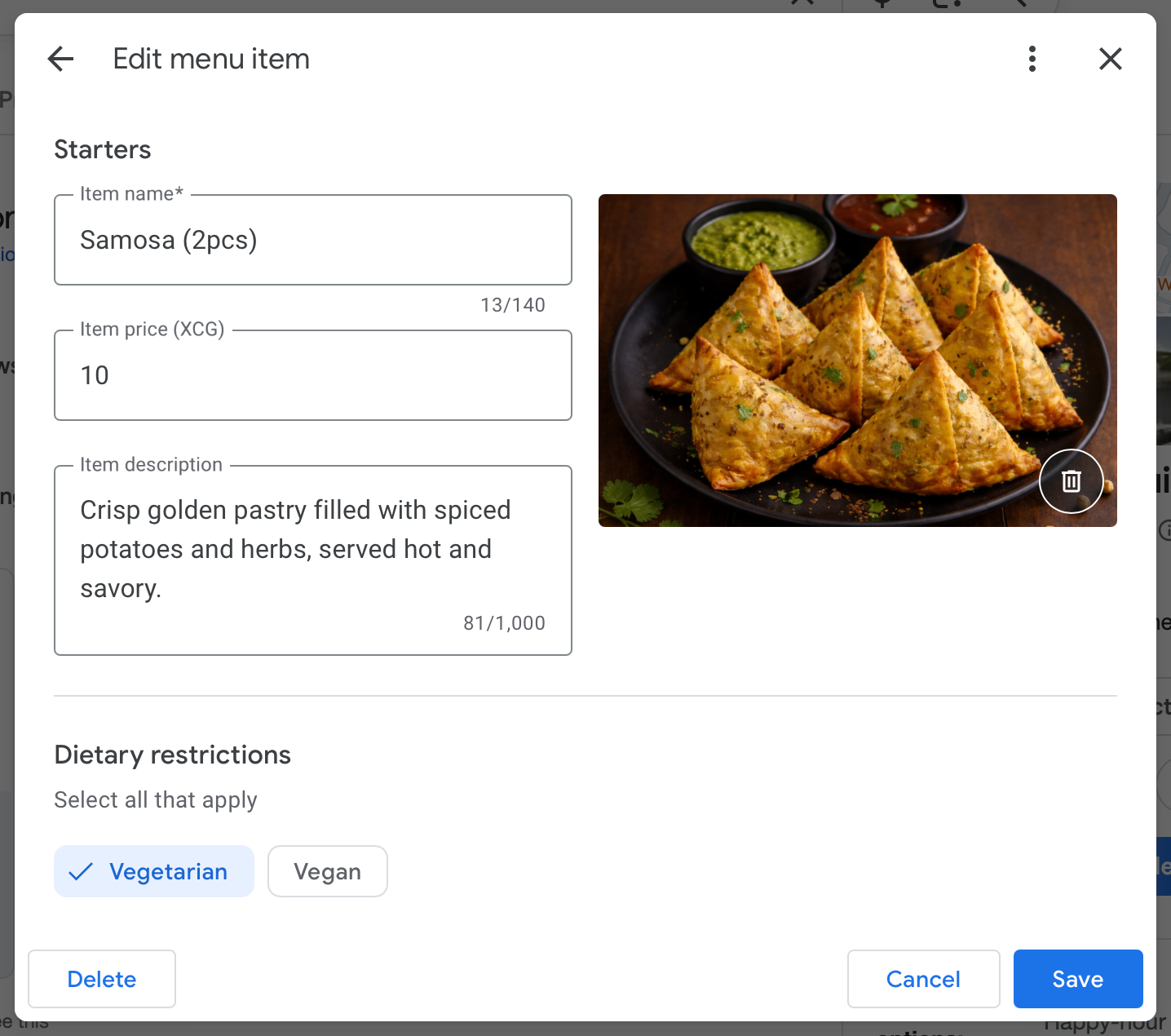
For businesses operating large restaurant chains, this creates two major problems:
Time Inefficiency
If you manage 60 locations and it takes 30 to 60 minutes to configure each menu, you’re looking at 30 to 60 hours of repetitive work for a single update cycle.
Limited Data Structure
Modern customers expect detailed food information such as allergens, calorie counts, preparation methods, and spice levels. The GBP UI doesn’t allow this level of detail.
Streamlining Menu Management with GMBapi
GMBapi offers a solution by allowing you to upload a single, comprehensive menu and apply it across all your locations simultaneously. This not only saves time but also ensures consistency in your offerings.

“Bulk uploading and updating menus is a game changer for us”
Sven Bon
Marketing Manager at Restaurant Company Europe
Extended Menu Fields with GMBapi
Beyond the basic fields available in the standard Google Business Profile interface, GMBapi enables you to include additional details such as:
- Calories: Provide calorie information for health-conscious customers.
- Dietary Restrictions: Indicate if items are vegetarian, vegan, gluten-free, etc.
- Serves Number of People: Specify portion sizes suitable for sharing.
- Preparation Methods: Detail how dishes are cooked (e.g., grilled, fried).
- Allergens: List potential allergens present in dishes.
- Spiciness: Indicate the heat level of spicy dishes.
- Portion Size: Clarify the quantity or weight of servings.
- Ingredients: Provide a list of key ingredients for transparency.
By incorporating these fields, you offer a richer, more informative menu that caters to a broader range of customer needs and preferences.
Advantages for GMBapi Customers
GMBapi is designed for agencies and multi-location brands. Adding menus through a professional management lens provides several unique “wins”:
Increased “Near Me” Rankings
Google scans the text in your menu to match user queries. If a customer searches for “truffle pasta near me,” a business with “Truffle Pasta” written in its GBP menu will outrank a competitor who only has a photo of their menu. GMBapi helps ensure this data is consistent and keyword-rich across all locations.
Bulk Management & Consistency
For a brand with dozens of locations, updating a seasonal menu manually is a nightmare. GMBapi advantages:
- You can push menu updates, services, or product lists in bulk. This ensures that every location reflects the current pricing and availability instantly, protecting your brand integrity and enhancing consistency across locations.
- Transitioning from a manual workflow, which requires 30 to 60 hours to update 60 locations, to a bulk API workflow allows you to complete the entire update cycle in minutes with a single upload, freeing your marketing and operations teams to focus on strategy instead of repetitive data entry.
Higher Conversion and Engagement Rates
Many users decide where to eat without ever leaving Google Search.
The “Menu” Tab: Having a clean, readable menu directly on your profile reduces friction. GMBapi Advantage: By using the platform to monitor “Customer Actions,” you can see exactly how many people are clicking your menu, allowing you to A/B test which items or descriptions drive the most engagement.
Better Data for AI & Voice Search
As AI-driven search (like Gemini or ChatGPT) becomes more prevalent, these tools rely on structured data. A text-based menu added via GBP provides the exact data these AI models need to recommend your business for specific dish requests.
Reduced Customer Churn for agencies and franchisees
Nothing frustrates a customer more than seeing a dish online that is no longer served. GMBapi makes it easy to “Act Fast” and remove items or update prices across your entire network of locations, reducing negative reviews or frustrated customers or franchisees caused by outdated information.
Consistency Across Locations - flexibility as an option
Bulk menu uploads also ensure standardised branding, accurate pricing synchronisation, consistent item descriptions, reduced human error and faster seasonal or promotional rollouts.
And for chains running limited-time offers or seasonal menus, speed is critical. Bulk publishing ensures all locations go live simultaneously.
For many restaurant chains, menus differ. Pricing might be different per location or subset of locations, depending on location and competition. Sometimes the menu is different as well. We allow for insert or override options to make sure we can standardise as much of the work as possible, but keep local differentiation at heart.
Ideal Customer Profile for Bulk Menu Uploading
1. Enterprise Food Chains & Franchise Groups High-volume operators who need to push standardized (or regionally varied) menus across hundreds of locations.
- Target Categories: Fast Food Restaurants, Pizza Restaurants, Italian Restaurants, and Casual Dining.
- The Pain Point: Manually updating seasonal items or price changes across 50+ locations is prone to error.
2. Multi-Location Hospitality & Nightlife Brands Corporate groups managing diverse portfolios of bars, pubs, and specialized dining.
- Target Categories: Cocktail Bars, Pubs, Wine Bars, and Breweries.
- The Pain Point: Frequent rotations of craft beer lists and seasonal cocktail menus require a streamlined bulk-syncing process.
3. Large Coffee Shop & Bakery Chains High-traffic “grab-and-go” brands where inventory changes are frequent and fast-paced.
- Target Categories: Cafes, Coffee Shops, Espresso Bars, Tea Houses, and Bakeries.
- The Pain Point: Daily “sold out” items and limited-time pastry offerings need to be updated in real-time to avoid customer frustration.
4. Cloud Kitchen Brands & Delivery-First Entities Businesses that exist primarily online and rely 100% on their digital “Menu” to drive sales.
- Target Categories: Food Delivery Services, Caterers, and Ghost/Cloud Kitchens.
- The Pain Point: Without a physical storefront, the Google “Menu” is the primary visual salesperson; it must be detailed and high-converting.
5. Specialized Food & Dessert Franchises Niche brands with high visual appeal and specific product sets.
- Target Categories: Ice Cream Shops, Juice Shops, Donut Shops, and Specialty Sweet Shops.
- The Pain Point: Managing complex modifiers (toppings, flavors, sizes) across multiple store profiles.
6. Marketing Agencies for the Food Industry The “Aggregator” profile that handles the technical SEO and profile management for multiple restaurant clients simultaneously.
Future-Ready Menu Management
As search platforms continue to prioritise structured data, richer menu information will become increasingly important. Providing details like allergens, preparation methods, and ingredient lists improves customer trust and enhances search visibility.
Bulk menu management through GMBapi positions businesses to scale efficiently while delivering higher-quality customer information.
Conclusion
Adding a detailed menu to your Google Business Profile is a strategic move that enhances customer experience, boosts your visibility in search results, and streamlines menu management across multiple locations. Utilising tools like GMBapi can further optimise this process, ensuring your restaurant stands out in a competitive market.
If you need assistance integrating GMBapi into your restaurant’s operations or have further questions about optimising your Google Business Profile, feel free to ask.
Why GMBapi?
Now is the best time to start tracking and reporting on your Google Business Profiles. Save time, and start optimising your local presence more effectively with our local SEO software.
Low Pricing
The lowest pricing and price matching if you find a cheaper alternative
Full Functionality
Unlimited access to posting content, multi-lingual AI responses to reviews, and adding additional users
Growth Opportunities
Include service hours, citations, local landing page optimisation, a Store Locator, or Apple Business Connect



Frequently Asked Questions
Yes, you can. Restaurants can list their menu items on their Google Business Profile – as long as their primary category is in the food and drinks business. How to add menu items to your Business Profile
Yes, you can. You can upload a PDF, and it will be translated into a Google Menu. You can replace an existing menu or append it to an existing menu. See explanation here.
Menu Section Name: The category for your items (e.g., Starters, Main Courses, Cocktails).
Item Name: The clear, specific name of the dish or drink as it appears on your physical menu.
Item Description: A keyword-rich summary (up to 1,000 characters) detailing ingredients and preparation to boost Local SEO.
Price: The numerical value of the item (ensure the currency matches your profile’s region).
Location ID/Store Code: The unique identifier for each specific branch to ensure the right menu hits the right restaurant.
Item Photo URL (Optional): A direct link to a high-quality image of the specific dish to increase visual engagement.
Dietary Attributes (Optional): Tags for Vegan, Vegetarian, or Gluten-Free options to help Google filter results for specific diets.
GMBapi currently positions itself as the “best value” alternative to high-cost competitors like Yext or Uberall, charging significantly less—roughly $4 to $8 per location depending on volume. To maintain this “90% of the benefit for 15% of the cost” identity, we price the Menu Management feature using a hybrid model that rewards high-volume users while capturing the value of the massive time savings you’ve identified.
- The “Value-Add” TiersInstead of a flat fee, offer the menu feature as part of a “Premium” or “Retail/Restaurant” bundle.
- Menu Plan (+$2–$5/loc): Adds Bulk Menu & Product Management.
- Example: At 60 locations, the customer pays an extra ~$180/month to save 60 hours of work. This is a “no-brainer” for most operations managers.
- The “One-Time” Setup Fee (Optional) For customers with massive, complex menus (e.g., a franchise with 200 items), we would consider a one-time Menu Onboarding Fee ($250–$500).
- The Logic: You provide a clean CSV template and ensure their first bulk upload is error-free. This reduces churn by ensuring the feature works perfectly from day one.
Yes. Google “reads” the text in your menu to match your business with specific search queries. If a customer searches for “gluten-free pizza” and that item is in your GBP menu, you are significantly more likely to appear in the local 3-pack. Google also translates images about dishes and is more likely to recommend your restaurant on specific queries such a “restaurant where shrimps are served” when Google has images and menu items that confirm that.
Menu photos are for customers to look at, and support both conversion and SEO. The Menu Feature (which GMBapi helps you upload in bulk) creates structured data that Google uses to understand your exact offerings and price points.
Yes. Using our Store Code/Location ID system, you can upload a single master file that assigns specific menus to specific branches, allowing for regional pricing or seasonal availability.
We provide a standardised CSV/Google Sheets template. You simply fill in the columns (Section, Item Name, Price, Description) and upload it to the GMBapi dashboard. Inform us with our AI assistant whilst in the free trial, and we will provide this document.
While Google allows for extensive menus, we recommend keeping it focused. Each section (e.g., “Main Courses”) can hold dozens of items, but keeping descriptions concise (under 1,000 characters) is best for mobile users.
Google’s policy strictly prohibits direct third-party delivery links (like UberEats or Deliveroo) within the item descriptions. However, you can use the “Menu Link” field on your profile to point to your own website’s ordering page.
Once pushed via GMBapi, updates typically appear within 24 to 48 hours, though most reflect much sooner.
Third-party menus often overwrite owner data. Using GMBapi to push your own menu helps you “claim” the menu space, ensuring your prices and descriptions are the ones customers see.
With GMBapi, you can simply remove the item from your master sheet and re-upload. The system will sync the changes across all selected locations in minutes, preventing customer disappointment.
There are two required fields:
Section Name (The category the item belongs to, such as Starters, Drinks, or Desserts)
Item Name (The exact name of the dish or drink as it appears on your menu.) Without these two fields, the system cannot process the menu item.
Optional fields improve visibility in local search results. Adding descriptions, dietary tags, allergens, and preparation methods helps Google better understand your menu. This increases the chances of showing up for specific searches like vegan pasta or gluten-free pizza.
Yes. Use commas to separate multiple values.
Correct: VEGAN, ORGANIC
Incorrect: VEGAN and ORGANIC
The system is case sensitive and only accepts exact predefined values.
Yes. Use commas to separate multiple values.
Correct: VEGAN, ORGANIC
Incorrect: VEGAN and ORGANIC
The system is case sensitive and only accepts exact predefined values.
You add the image filename to the image_name column. The image file must also be uploaded to the images folder.
Example:
Excel value: grilled_salmon.jpg
Images folder file: grilled_salmon.jpg
The names must match exactly.
Yes. You can update your Excel file at any time and re-upload it. The system will sync changes to the selected locations.
Download and open the Excel template
Fill in the locations sheet with Location IDs
Fill in the menu sheet with menu items
Add images to the images folder if available
Send the completed file back for review and upload
Common issues include:
Using currency symbols instead of numbers
Using incorrect enum values
Uploading images with different names than listed in Excel
Leaving required fields empty
Using the wrong currency codes for the location
Not having unique and descriptive names for the photo files
Focus on:
Detailed but clear item descriptions
Dietary and allergen tags
Accurate pricing
Proper section categorisation
High-quality item images
The more structured data you provide, the better search engines can match you to customer searches.
Start growing with GMBapi
Leverage AI to manage reviews, bulk publish content while ensuring consistency across all your local platforms. Stay ahead by monitoring competitors & showcasing what makes you stand out.
Our Transparent Pricing
EXPLORE PLANSHow Our Clients Keep Winning
SUCCESS STORIESHave any questions?
Feel free to contact us!
Trusted By

%20--%3e%3csvg%20version='1.1'%20id='Layer_1'%20xmlns='http://www.w3.org/2000/svg'%20xmlns:xlink='http://www.w3.org/1999/xlink'%20x='0px'%20y='0px'%20viewBox='0%200%20229%2033'%20style='enable-background:new%200%200%20229%2033;'%20xml:space='preserve'%3e%3cstyle%20type='text/css'%3e%20.st0{fill-rule:evenodd;clip-rule:evenodd;fill:%23ffffff;}%20.st1{fill:%23ffffff;}%20%3c/style%3e%3cg%3e%3cg%3e%3cpath%20class='st0'%20d='M166.4,6c0.1-2.2-1.7-3.2-3.7-2.8c-1.8,0.3-3.6,1.9-5,3.4v0c-0.5,0.6-1,0-1,0l0,0c-1.4-1.5-3.2-3.1-5-3.4%20c-1.9-0.4-3.7,0.6-3.7,2.8c0.1,3.9,4.8,3.9,7.7,2.4c-2.1,1.9-4.3,4.4-6.2,3.4c0,0,0,0-0.1-0.1c0.4-0.1,0.6-0.4,0.6-0.8%20c0-0.4-0.4-0.7-0.8-0.7c-0.4,0-0.7,0.4-0.7,0.9c0,0.2,0.1,0.3,0.2,0.4h0c2.7,2.9,6.3-1.5,8.3-3.8c0,0,0.1,0,0.1,0c0,0,0.1,0,0.1,0%20c2,2.3,5.6,6.8,8.3,3.9h0c0.1-0.1,0.2-0.3,0.2-0.4c0-0.4-0.3-0.8-0.7-0.9c-0.4,0-0.8,0.3-0.8,0.7c0,0.4,0.2,0.7,0.6,0.8%20c0,0-0.1,0.1-0.1,0.1c-1.9,1-4.1-1.4-6.2-3.4C161.6,9.9,166.3,9.9,166.4,6z%20M150.6,7.5c-3.1-2,0.5-6.8,6.3-0.2%20C156.9,7.3,153.7,9.4,150.6,7.5z%20M157.6,7.3c5.7-6.6,9.3-1.7,6.3,0.2C160.8,9.4,157.6,7.3,157.6,7.3z'/%3e%3c/g%3e%3cg%3e%3cpath%20class='st1'%20d='M0,0.7V0h3.7v17.9h0.1c1.1-2.1,3.4-4.5,6.6-4.5c4.7,0,6,2.4,6,5v14.1h-3.7V17.3c0-2.4-1.2-3.2-2.6-3.2%20c-3.7,0-5.6,3.7-6.4,5.2v13.2H0V0.7z'/%3e%3cpath%20class='st1'%20d='M24.7,14.1v-0.7h3.7v15.8c0,1.9,1.1,3.1,2.7,3.1c3.1,0,5.8-3.5,5.8-6.8V14.1v-0.7h3.7v19.1H37v-4h-0.1%20c-0.4,1-2.2,4.6-6.2,4.6c-4.4,0-6-2.3-6-4.9V14.1z'/%3e%3cpath%20class='st1'%20d='M49,15.1v-1.7h3.7v4.5h0.1c1.1-2.1,3.3-4.5,6.6-4.5c4.7,0,6,2.4,6,5v14.1h-3.7V17.3c0-2.4-1.2-3.2-2.6-3.2%20c-3.7,0-5.6,3.7-6.4,5.2v13.2H49V15.1z'/%3e%3c/g%3e%3cpolygon%20class='st1'%20points='72.1,0%2075.8,0%2075.8,24.6%2086.4,14.4%2087.7,14.4%2080.1,21.5%2088.9,32.5%2084.1,32.5%2077.4,24.1%2075.8,25.6%2075.8,32.5%2072.1,32.5%20'/%3e%3cg%3e%3cpath%20class='st1'%20d='M96.2,25.6c0,3.1,0.4,6.7,4.5,6.7c3.7,0,6.4-2.5,7-6.1h0.7c-0.7,4.1-3.7,6.8-7.8,6.8c-5.2,0-8.8-4-8.8-9.8%20c0-4.3,3.4-9.8,8.2-9.8c5.2,0,7.9,5.8,7.9,7.7c0,0.3-0.1,0.4-0.4,0.4H96.2V25.6z%20M103.9,19.5c0-2.8-0.8-5.4-3.7-5.4%20c-3.1,0-4,2.6-4,5.4v1.2h7.4c0.2,0,0.3-0.1,0.3-0.3V19.5z'/%3e%3cpath%20class='st1'%20d='M113.6,32.5V14.1v-0.7h3.7v4.3h0.1c1.2-2.2,3-4.3,6.3-4.3c2.8,0,5.6,0.8,6,4.7h0.1c0.9-2.5,3.1-4.8,6.4-4.7%20c4.5,0,6,2.6,6,5.4v13.7h-3.7V18c0-3.2-1.4-3.9-3.1-3.9c-2.6,0-4.8,2.8-5.7,5.9v12.5H126V17.1c0-2.2-1.1-3-2.9-3%20c-2.6,0-4.6,2.1-5.9,5.2v13.2H113.6z'/%3e%3cpath%20class='st1'%20d='M157.3,13.4c5.7,0,9.3,4.7,9.3,9.8c0,5.1-3.7,9.8-9.3,9.8c-5.7,0-9.3-4.7-9.3-9.8%20C147.9,18.1,151.6,13.4,157.3,13.4%20M162.4,21.5c0-3.8-0.2-7.4-5.1-7.4c-4.9,0-5.1,3.5-5.1,7.4v3.4c0,3.8,0.2,7.4,5.1,7.4%20c4.9,0,5.1-3.5,5.1-7.4V21.5z'/%3e%3c/g%3e%3cpolygon%20class='st1'%20points='172.6,0.7%20172.6,0%20176.3,0%20176.3,32.5%20172.6,32.5%20'/%3e%3cpolygon%20class='st1'%20points='184.8,0.7%20184.8,0%20188.5,0%20188.5,32.5%20184.8,32.5%20'/%3e%3cg%3e%3cpath%20class='st1'%20d='M198.7,25.6c0,3.1,0.4,6.7,4.5,6.7c3.7,0,6.4-2.5,7-6.1h0.7c-0.7,4.1-3.7,6.8-7.8,6.8c-5.2,0-8.8-4-8.8-9.8%20c0-4.3,3.4-9.8,8.2-9.8c5.2,0,7.9,5.8,7.9,7.7c0,0.3-0.1,0.4-0.4,0.4h-11.5V25.6z%20M206.4,19.5c0-2.8-0.7-5.4-3.7-5.4%20c-3.1,0-4,2.6-4,5.4v1.2h7.4c0.2,0,0.3-0.1,0.3-0.3V19.5z'/%3e%3cpath%20class='st1'%20d='M216.6,15.1v-1.7h3.7v5.2h0.1c0.5-2,2.1-5.2,5.7-5.2c1.6,0,2.9,1.1,2.9,2.6c0,1.1-0.7,2.1-2,2.1%20c-1.5,0-1.9-0.8-1.9-1.9c0-1,0.5-1.6,1-1.9c-0.2-0.1-0.4-0.1-0.6-0.1c-1.8,0-5.1,2.9-5.1,8.6v9.8h-3.7V15.1z'/%3e%3c/g%3e%3c/g%3e%3c/svg%3e)

'%3e%3c/path%3e%3cpath%20d='M27.28,30.32H22.72V18.87a2.26,2.26,0,0,1,.67-1.62l6.75-6.75a2.25,2.25,0,0,1,1.62-.67H43.22v4.56H30.69a3.42,3.42,0,0,0-3.42,3.42Z'%20transform='translate(0%20-0.18)'%3e%3c/path%3e%3cpath%20d='M63.8,9.82h3.52V13h.08a6.24,6.24,0,0,1,5.34-3.66,10.69,10.69,0,0,1,2.49.28V13a5.6,5.6,0,0,0-2.09-.36c-3.38,0-5.59,3.22-5.59,8.37v9.33H63.8Z'%20transform='translate(0%20-0.18)'%3e%3c/path%3e%3cpath%20d='M179.24,22.35c0,3.09-2,5.44-5.7,5.44-1.72,0-3.81-1.18-3.81-3.36,0-3.65,5.06-4,7.1-4,.8,0,1.6.08,2.41.08Zm-11-7.87a9.52,9.52,0,0,1,5.94-2.13c3.77,0,5.05,1.84,5.05,5.38-1.48-.08-2.53-.08-4-.08-3.89,0-9.52,1.6-9.52,6.75,0,4.5,3.1,6.42,7.51,6.42a7.6,7.6,0,0,0,6.34-3.11h.08v2.61H183V17.79c0-5.6-2.36-8.47-8.21-8.47A13.1,13.1,0,0,0,168,11.24Z'%20transform='translate(0%20-0.18)'%3e%3c/path%3e%3cpath%20d='M88,22.35c0,3.09-2,5.44-5.7,5.44-1.73,0-3.81-1.18-3.81-3.36,0-3.65,5.06-4,7.1-4,.8,0,1.6.08,2.41.08ZM77,14.48A9.52,9.52,0,0,1,83,12.35c3.77,0,5.06,1.84,5.06,5.38-1.48-.08-2.53-.08-4-.08-3.89,0-9.52,1.6-9.52,6.75,0,4.5,3.1,6.42,7.51,6.42a7.6,7.6,0,0,0,6.34-3.11h.08v2.61H91.8V17.79c0-5.6-2.36-8.47-8.21-8.47a13.1,13.1,0,0,0-6.74,1.92Z'%20transform='translate(0%20-0.18)'%3e%3c/path%3e%3cpath%20d='M94.88,9.82h3.64V13h.08a7.39,7.39,0,0,1,6.73-3.72c5.31,0,7.66,3.28,7.66,8.79V30.32h-3.76V19.69c0-4.79-1-7.13-4.35-7.33-4.31,0-6.24,3.47-6.24,8.48v9.48H94.88Z'%20transform='translate(0%20-0.18)'%3e%3c/path%3e%3cpath%20d='M137.55,26.33a10.06,10.06,0,0,0,4.7,1.45c1.72,0,3.85-.73,3.85-2.95,0-3.76-8.87-3.43-8.87-9.21,0-4.27,3.18-6.31,7.23-6.31a15.49,15.49,0,0,1,4.7.81l-.32,3.27a11,11,0,0,0-4-1.05c-1.92,0-3.61.81-3.61,2.51,0,4.2,8.87,3,8.87,9.58,0,4.39-3.5,6.39-7.15,6.39a11.84,11.84,0,0,1-5.62-1.12Z'%20transform='translate(0%20-0.18)'%3e%3c/path%3e%3cpath%20d='M164.48,12.85h-5.43V24.11c0,2.38,1.45,3.67,3.17,3.67a4.65,4.65,0,0,0,2.57-.73v3.2a11.94,11.94,0,0,1-3.21.56c-3.89,0-6.29-1.83-6.29-5.94v-12h-4.62v-3h4.62V5.08l3.76-1.2V9.82h5.43Z'%20transform='translate(0%20-0.18)'%3e%3c/path%3e%3cpath%20d='M189.56,20c-.08-3.76,1.53-7.64,5.62-7.64s6.06,3.92,6.06,7.76c0,3.43-1.77,7.68-6,7.68C191.17,27.79,189.48,23.22,189.56,20ZM201.4,30.32H205V.18h-3.76V12.6h-.08C200,10.72,198,9.32,194.38,9.32c-5.94,0-8.84,4.85-8.84,10.37s2.61,11.13,8.8,11.13a8.22,8.22,0,0,0,7-3.36h.08Z'%20transform='translate(0%20-0.18)'%3e%3c/path%3e%3cpath%20d='M119.57,20c-.08-3.76,1.53-7.64,5.62-7.64s6.06,3.92,6.06,7.76c0,3.43-1.77,7.68-6,7.68C121.17,27.79,119.48,23.22,119.57,20Zm11.84,10.33H135V.18h-3.76V12.6h-.08C130,10.72,128,9.32,124.38,9.32c-5.94,0-8.84,4.85-8.84,10.37s2.61,11.13,8.8,11.13a8.22,8.22,0,0,0,7-3.36h.08Z'%20transform='translate(0%20-0.18)'%3e%3c/path%3e%3c/svg%3e)