A Complete Guide To Bulk Product Uploads for Google Business Profiles
Turn online “window shoppers” into foot traffic. Discover the most efficient ways to showcase your live product inventory across all your locations simultaneously.
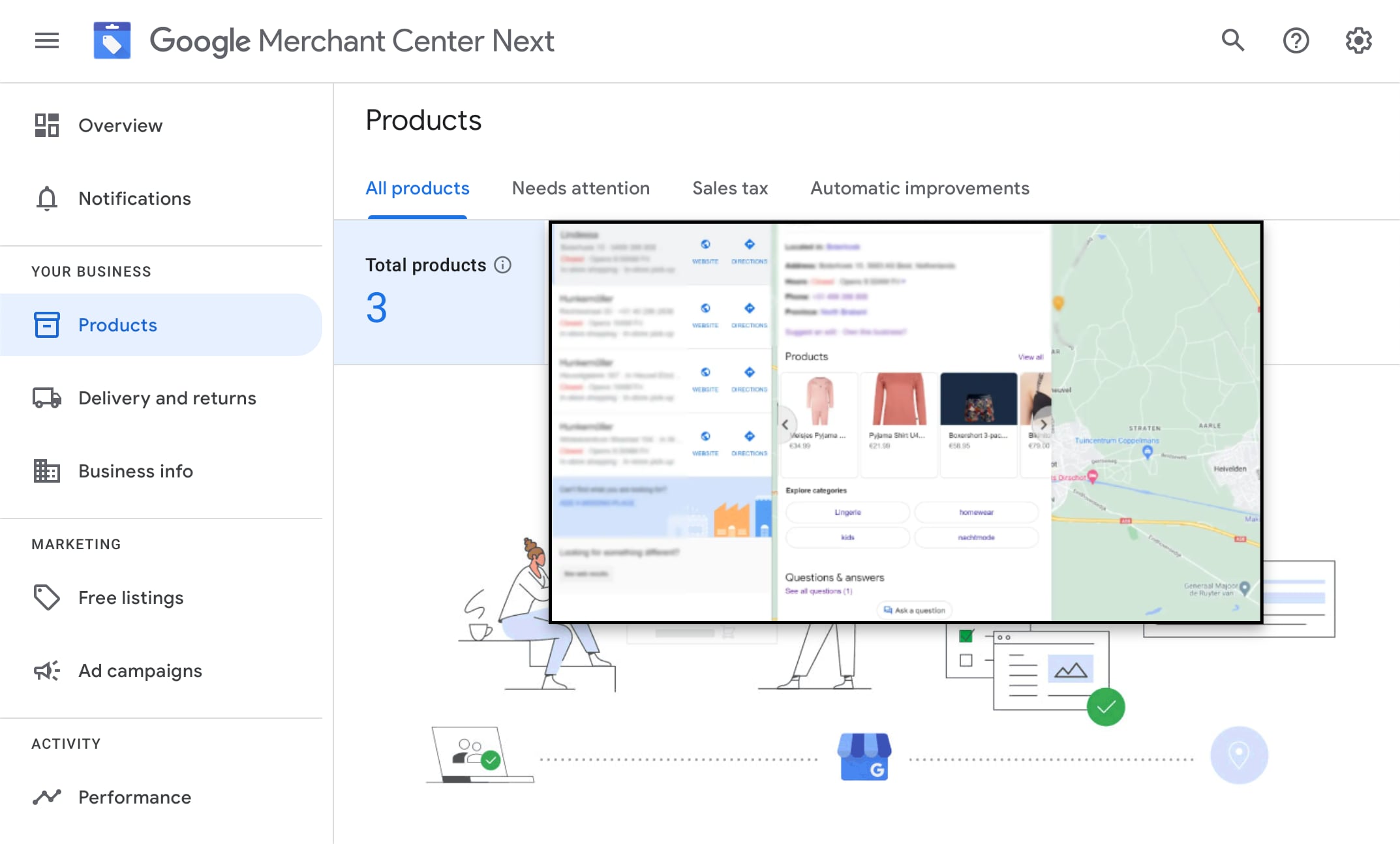
Keeping your Google Business Profiles updated with accurate inventory is one of the fastest ways to capture local search intent. When customers can see what you offer directly on Google Search and Maps, it removes the guesswork and gives them a reason to walk through your front door.
Whether you manage 5 retail stores or 5,000, keeping your product data current expands your reach for high-intent, near-store searches. But if you manage multiple locations, you already know the problem: Google’s native dashboard won’t let you bulk-upload products across different locations at the same time. This guide breaks down the most reliable paths to handle your inventory at scale, how Google Merchant Center works today, and how to pick the right strategy for your business.
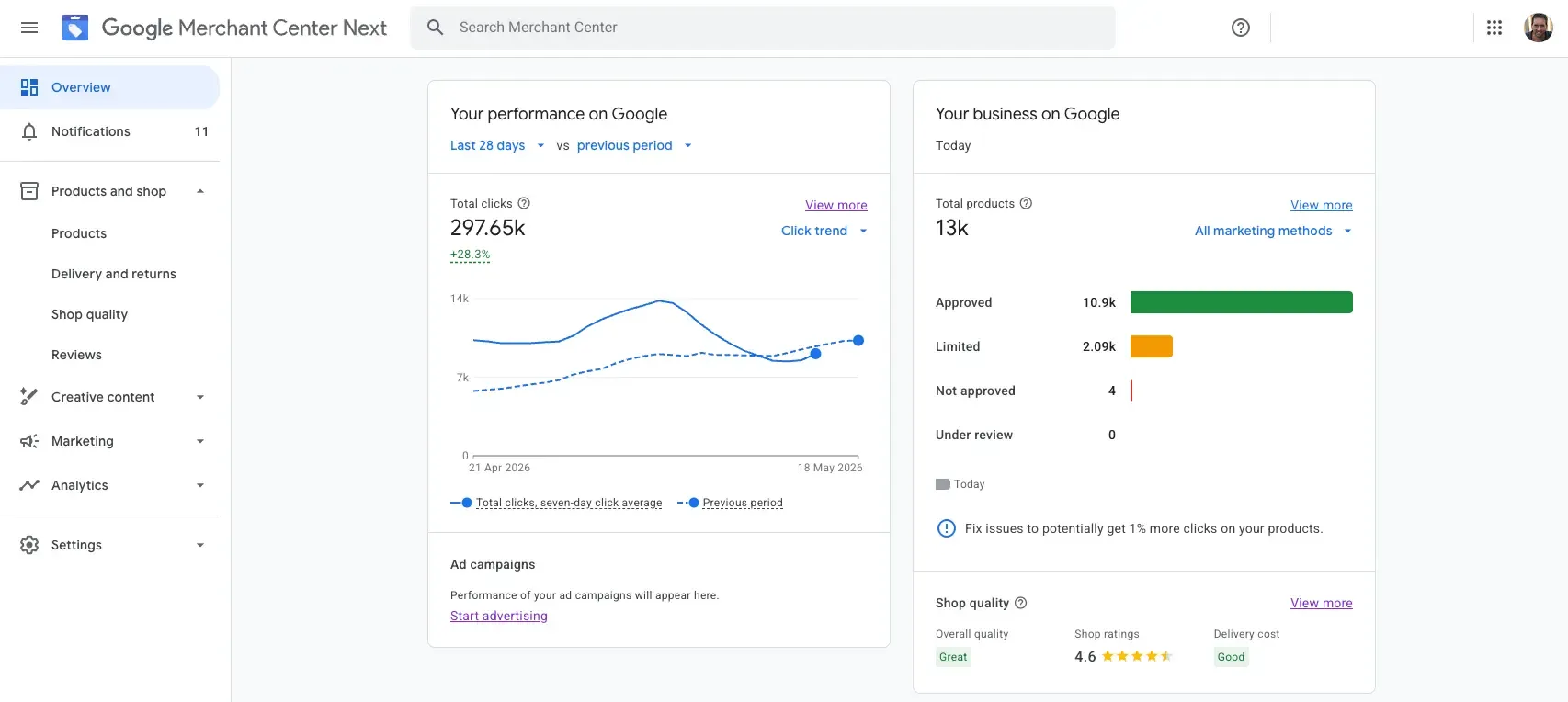
The Structural Challenge of Bulk Uploads in Google Business Profile
Google’s standard interface forces you to manage products one location at a time. If you have hundreds of products across dozens of stores, updating them manually is time-intensive work.
To get your stock visible across your entire retail footprint, you have four main paths to choose from, depending on your business size and setup:
Manual Uploads
Adding items one by one directly into each profile. This only makes sense if you have a handful of locations and a small, static product line
Managed Data Entry
Offloading the manual labour to a third-party service (like GMBapi) to handle the data entry updates for you cleanly and consistently.
Google Merchant Center (GMC)
Letting Google automatically read your website’s e-commerce data to build a centralised product feed.
Local Product Inventory Feeds
Connecting a dynamic, real-time feed through Merchant Center to sync live, store-by-store inventory and pricing.
Manual vs. Automated: Choosing the Right Setup
Picking the wrong approach can break your local presence. For example, if you connect a live automated feed after spending hours manually typing products into Google, the incoming feed will instantly overwrite all your hard manual work.
Operational Feature | Manual Profile Input | Merchant Center Integration |
|---|---|---|
Best For... | Small businesses with static inventories (under 20 items) | Retailers and enterprise brands with shifting stock. |
Update Frequency | Low. Every price change or new product requires manual data entry per item. | High. Systems continuously pull live data from your site or inventory API. |
System Rules | Risk of being overwritten if you connect external data later | Absolute priority. Disables manual overrides to protect data accuracy. |
Unlock Free Visibility on Google Maps, Search, and AI Overviews
The best part about keeping your product data updated is that Google displays your items for free. Without spending a single penny on ads, your stock can show up across Google Maps, standard Search results, Google Images, YouTube, and the Google Shopping tab.
To maximise this free visibility, you need to keep a close eye on two things:
- Match Your Prices Exactly: Make sure the price and availability listed on your Google profiles match your actual store and website exactly. If Google notices a mismatch, your products won’t show up.
- Fill Out Your Policies: Google prioritises listings that have clear shipping costs and return policies set up in the dashboard. Leaving these blank can hurt your local reach.
What Counts as a "Product" on Google?
Google accepts a surprisingly wide range of items under its “Products” feature. You don’t actually need to run a traditional retail shop to use it. Google allows you to upload physical inventory and product categories, and also service menus and specialised service categories.
Tip for Service Area Businesses:
If you run a service-based business (like a clinic, digital agency, or repair shop), listing your key offerings as “products” is a fantastic local SEO hack. It gives you extra visual real estate on the map pack and helps Google link your business to specific service-related searches.
Step-by-Step: How to Manually Upload Products to Your GBP
If you only have one or two brick-and-mortar locations with a small, permanent inventory, handling your uploads manually directly inside Google Search is the most cost-effective option.
Here is exactly how to add your products to a single profile:
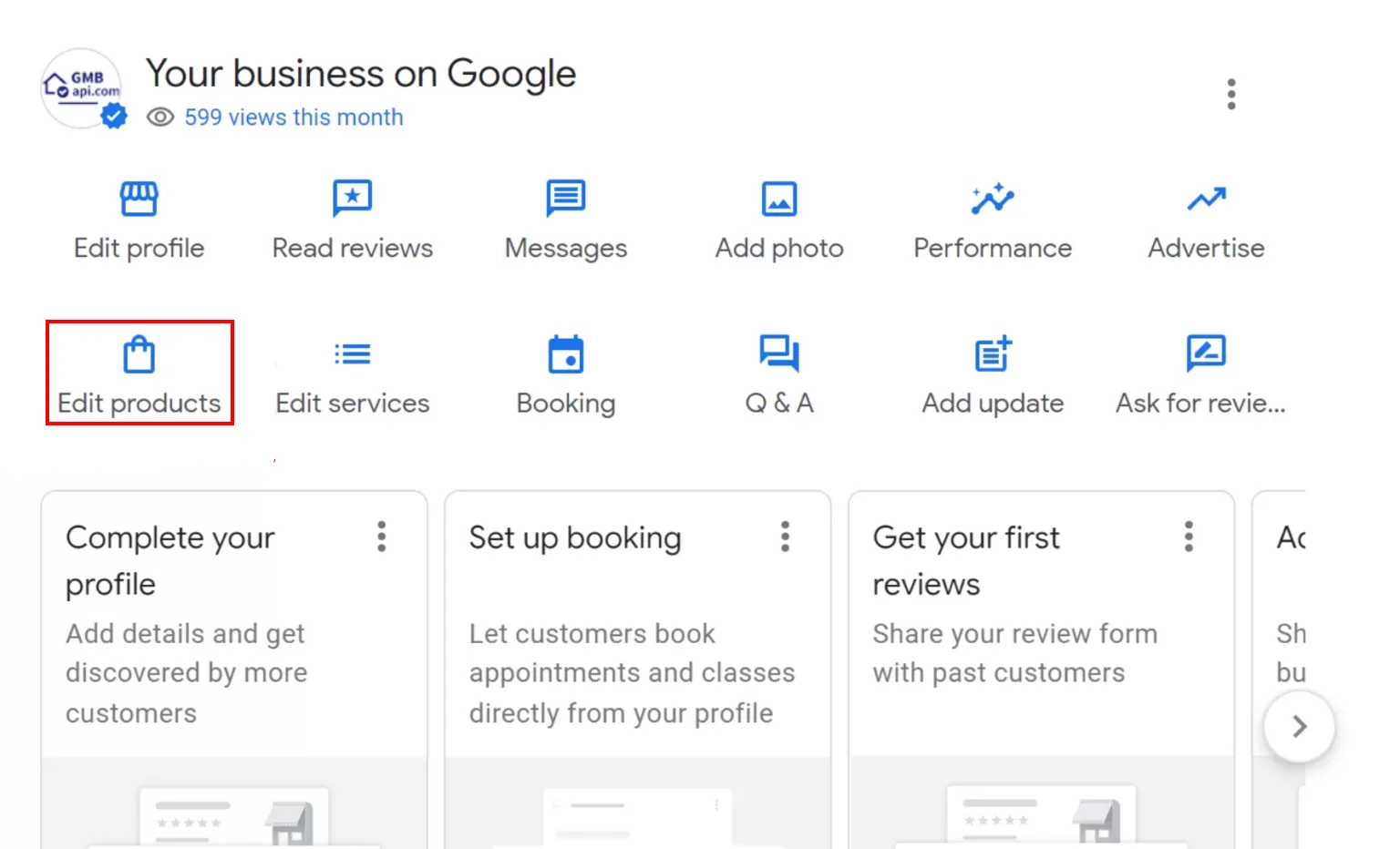
- Access your Dashboard: Sign into the Google account associated with your business and look up your specific location name directly in Google Search to open your business manager panel.
- Open the Product Editor: Click the Edit products button in the main menu dashboard.
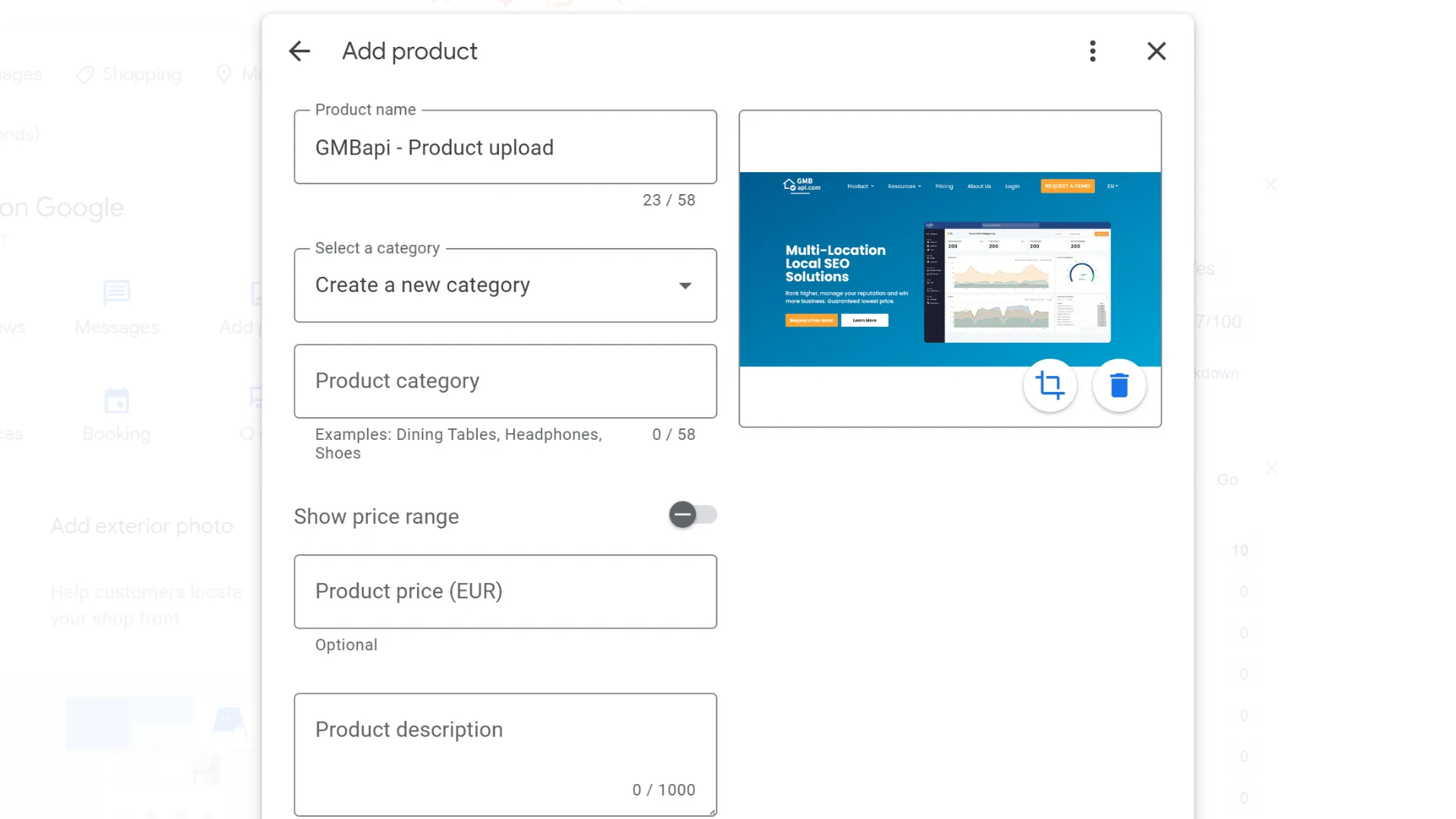
3. Fill in Your Product Specs: Click Add product and input your product name, select or create an inventory category, add a clear price, and write a focused product description.
4. Add High-Quality Imagery: Upload a clear, well-lit photo showcasing exactly what the item is. (Google recommends a clean format with a 4:3 aspect ratio.
5. Attach Your Call-to-Action: Choose an action button (like “Learn more” or “Order online”) and insert a direct landing page link. Pro-Tip: Always append a UTM tracking tag to this URL so you can measure exact clicks inside GA4.
If you have made a mistake, don’t worry. You can delete the uploaded product and then re-add it, or directly edit the product.
Important Restaurant Exception:
If you are marketing a restaurant or food-service venue, do not list your individual food items here. Google prefers you to use the dedicated Menu and Popular Dishes features to maintain proper listing health and format consistency.
Scaling Up: Why Google Merchant Center Is the Retail Standard
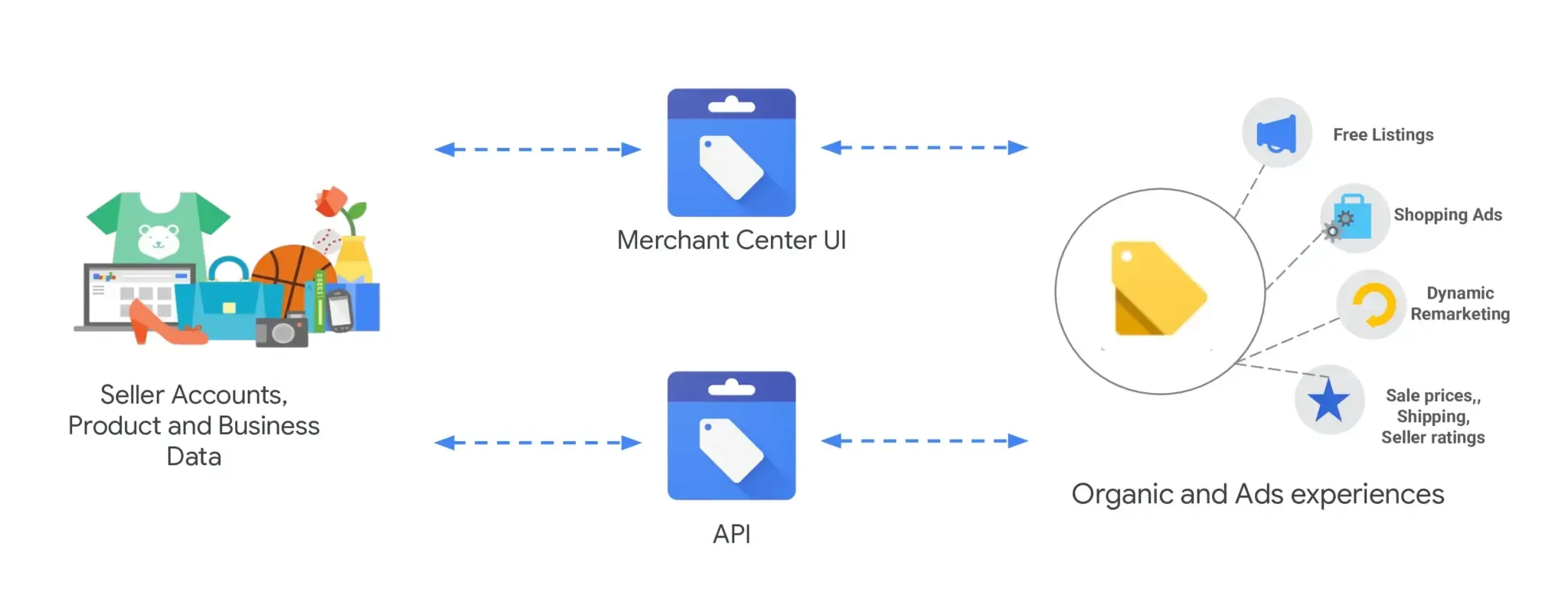
If you handle physical goods across a large retail network, manual updates won’t cut it. You need Google Merchant Center (GMC). GMC acts as a central inventory hub, pushing your products across Google Search, Maps, YouTube, and the Shopping tab simultaneously.
By linking GMC to your Google Business Profiles, you can completely automate your local inventory management:
- Automated Website Crawling: Google can automatically read your e-commerce site and build your product listings for you without any manual data entry.
- Seamless E-commerce Syncing: Direct integrations with major platforms like Shopify, WooCommerce, and Amazon keep your stock levels and pricing aligned.
- Hybrid Data Ingestion: Mix and match how you upload your data, use direct website crawling for standard lines, and custom product feeds for specialised, location-specific inventory.

The 2026 API Migration: Keeping Your Data Architecture Future-Proof
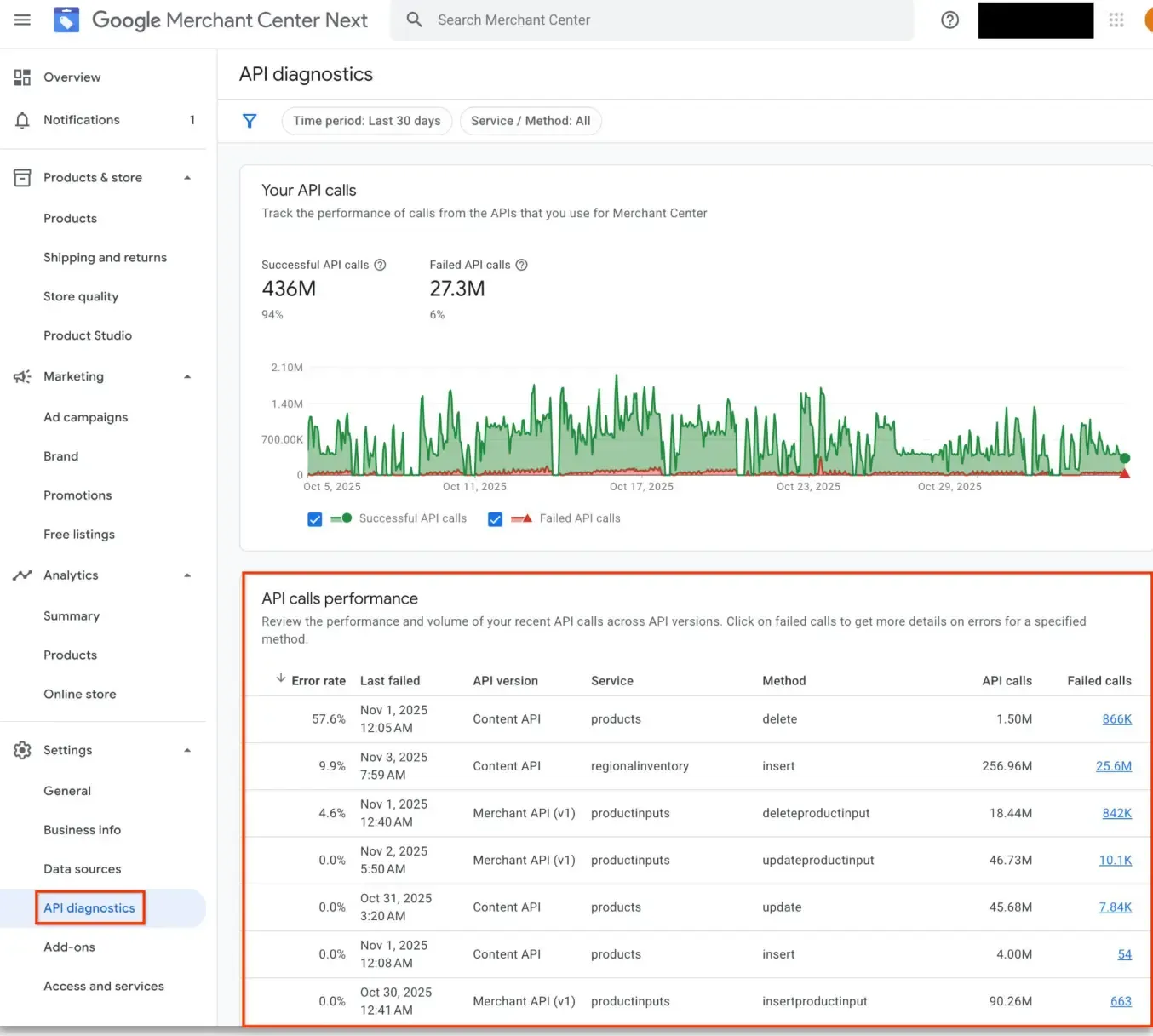
Google is currently overhauling its backend retail architecture. The legacy Content API for Shopping is officially sunsetting on August 18, 2026, making a migration to the new, modular Merchant API mandatory for automated retail systems. Instead of passively loading data and waiting to see if it worked, the new API introduces instant notifications that alert your technical team the second a product status or policy violation changes.
Integrated access to tools like Google Product Studio uses generative AI to instantly adjust backgrounds and fix low-resolution product photos, ensuring your local listings look sharp. The implementation of the Model Context Protocol (MCP) allows developers to link AI development tools directly to Google’s live API schemas, significantly speeding up the transition away from legacy code.
Global Variations: Navigating European Retail Regulations
If you manage retail stores in the European Economic Area (EEA) or the United Kingdom, your local product feeds face an entirely different set of rules than standard US configurations.
Due to the Digital Markets Act (DMA), Google has altered how local search maps and products display in Europe to prevent self-preferencing. To maintain listing visibility and data tracking accuracy across Europe, brands must comply with strict local variables:
- Mandatory Data Parameters: European inventory feeds require explicit, accurate parameters for location-specific variables, such as local minimum order values and precise store pickup costs.
- Consent Mode v2 Alignment: To maintain data tracking legitimacy and safely monitor user actions across your European profiles, your digital ecosystem must correctly implement Google Consent Mode v2.This transparency helps shoppers feel confident before they visit, and brands using Local Inventory Feeds often see higher conversions as a result.



Take the Headache Out of Bulk Product Management
Whether you are navigating European compliance data, planning an API migration, or simply trying to get your physical inventory visible across hundreds of local map listings, you don’t have to tackle Google’s operational friction alone.
If you would like further help with bulk uploading products to Google My Business or if you have any other questions about your Google Business Profiles, please get in touch. Start your free GMBapi trial today.
Frequently Asked Questions
Yes. It is designed to be the hub for managing your products across Google. Google collects information and you are providing it to them. Most of our preferred partners for managing feed are not free but are available at very reasonable costs (25 euro/dollar per month).
Google Merchant Center can scrape product data off your website. Some of the ecommerce tools you have could potentially be connected to Google Merchant Center. Or, we could bulk download and upload CSVs.
Adding a few good photos and a compelling description will get you a long way. If you have too many products to manage this check out these open source initiative to use generative AI for product description optimisation.
Get an API developer added to your Google Merchant Center, migrate from the content API to the Merchant API, ask your LLM of choice to check the existing resources, and create a plan.
Nope. Connecting the Google Merchant Center will disable all the manual options for the locations within your location group.
GMC checks your website regularly to keep your product listings up to date, but the exact crawl frequency varies. Generally, changes to important details like pricing or structured data are updated fairly quickly, often within a day or two. The timing depends on things like how active your site is and how often product details change. So, if you keep your product info current on your site, GMC will usually pick up those updates smoothly in its crawls.
Yes, you can bulk upload products from Shopify, WooCommerce, Etsy and Amazon into Merchant Center Next. It’s got all the import options to connect with these e-commerce platforms so product syncing is a breeze.
Once you connect your e-commerce platform, Merchant Center will automatically sync your product data – titles, descriptions, prices and images. This keeps your listings up to date across Google’s network.
Connecting your store lets you manage your product data in one place, and use Google’s free platforms (Google Maps, Shopping, Business Profiles) and Google’s advertising tools to increase your product visibility and reach more customers.
Yes! Whether you’re using Shopify’s enterprise infrastructure, WooCommerce’s customisation, Etsy’s marketplace for handmade goods or Amazon’s global reach, Merchant Center Next can handle stores of any size and help you get more visibility on Google.
You can import product data – titles, descriptions, prices and images – from your platform into Merchant Center and manage and optimise your listings.
By connecting with Merchant Center you can show your products across Google’s free platforms and advertising channels like Google Shopping and Maps and increase visibility and sales.
Start growing with GMBapi
Leverage AI to manage reviews, bulk publish content while ensuring consistency across all your local platforms. Stay ahead by monitoring competitors & showcasing what makes you stand out.
Our Transparent Pricing
EXPLORE PLANSHow Our Clients Keep Winning
SUCCESS STORIESHave any questions?
Feel free to contact us!
Trusted By

%20--%3e%3csvg%20version='1.1'%20id='Layer_1'%20xmlns='http://www.w3.org/2000/svg'%20xmlns:xlink='http://www.w3.org/1999/xlink'%20x='0px'%20y='0px'%20viewBox='0%200%20229%2033'%20style='enable-background:new%200%200%20229%2033;'%20xml:space='preserve'%3e%3cstyle%20type='text/css'%3e%20.st0{fill-rule:evenodd;clip-rule:evenodd;fill:%23ffffff;}%20.st1{fill:%23ffffff;}%20%3c/style%3e%3cg%3e%3cg%3e%3cpath%20class='st0'%20d='M166.4,6c0.1-2.2-1.7-3.2-3.7-2.8c-1.8,0.3-3.6,1.9-5,3.4v0c-0.5,0.6-1,0-1,0l0,0c-1.4-1.5-3.2-3.1-5-3.4%20c-1.9-0.4-3.7,0.6-3.7,2.8c0.1,3.9,4.8,3.9,7.7,2.4c-2.1,1.9-4.3,4.4-6.2,3.4c0,0,0,0-0.1-0.1c0.4-0.1,0.6-0.4,0.6-0.8%20c0-0.4-0.4-0.7-0.8-0.7c-0.4,0-0.7,0.4-0.7,0.9c0,0.2,0.1,0.3,0.2,0.4h0c2.7,2.9,6.3-1.5,8.3-3.8c0,0,0.1,0,0.1,0c0,0,0.1,0,0.1,0%20c2,2.3,5.6,6.8,8.3,3.9h0c0.1-0.1,0.2-0.3,0.2-0.4c0-0.4-0.3-0.8-0.7-0.9c-0.4,0-0.8,0.3-0.8,0.7c0,0.4,0.2,0.7,0.6,0.8%20c0,0-0.1,0.1-0.1,0.1c-1.9,1-4.1-1.4-6.2-3.4C161.6,9.9,166.3,9.9,166.4,6z%20M150.6,7.5c-3.1-2,0.5-6.8,6.3-0.2%20C156.9,7.3,153.7,9.4,150.6,7.5z%20M157.6,7.3c5.7-6.6,9.3-1.7,6.3,0.2C160.8,9.4,157.6,7.3,157.6,7.3z'/%3e%3c/g%3e%3cg%3e%3cpath%20class='st1'%20d='M0,0.7V0h3.7v17.9h0.1c1.1-2.1,3.4-4.5,6.6-4.5c4.7,0,6,2.4,6,5v14.1h-3.7V17.3c0-2.4-1.2-3.2-2.6-3.2%20c-3.7,0-5.6,3.7-6.4,5.2v13.2H0V0.7z'/%3e%3cpath%20class='st1'%20d='M24.7,14.1v-0.7h3.7v15.8c0,1.9,1.1,3.1,2.7,3.1c3.1,0,5.8-3.5,5.8-6.8V14.1v-0.7h3.7v19.1H37v-4h-0.1%20c-0.4,1-2.2,4.6-6.2,4.6c-4.4,0-6-2.3-6-4.9V14.1z'/%3e%3cpath%20class='st1'%20d='M49,15.1v-1.7h3.7v4.5h0.1c1.1-2.1,3.3-4.5,6.6-4.5c4.7,0,6,2.4,6,5v14.1h-3.7V17.3c0-2.4-1.2-3.2-2.6-3.2%20c-3.7,0-5.6,3.7-6.4,5.2v13.2H49V15.1z'/%3e%3c/g%3e%3cpolygon%20class='st1'%20points='72.1,0%2075.8,0%2075.8,24.6%2086.4,14.4%2087.7,14.4%2080.1,21.5%2088.9,32.5%2084.1,32.5%2077.4,24.1%2075.8,25.6%2075.8,32.5%2072.1,32.5%20'/%3e%3cg%3e%3cpath%20class='st1'%20d='M96.2,25.6c0,3.1,0.4,6.7,4.5,6.7c3.7,0,6.4-2.5,7-6.1h0.7c-0.7,4.1-3.7,6.8-7.8,6.8c-5.2,0-8.8-4-8.8-9.8%20c0-4.3,3.4-9.8,8.2-9.8c5.2,0,7.9,5.8,7.9,7.7c0,0.3-0.1,0.4-0.4,0.4H96.2V25.6z%20M103.9,19.5c0-2.8-0.8-5.4-3.7-5.4%20c-3.1,0-4,2.6-4,5.4v1.2h7.4c0.2,0,0.3-0.1,0.3-0.3V19.5z'/%3e%3cpath%20class='st1'%20d='M113.6,32.5V14.1v-0.7h3.7v4.3h0.1c1.2-2.2,3-4.3,6.3-4.3c2.8,0,5.6,0.8,6,4.7h0.1c0.9-2.5,3.1-4.8,6.4-4.7%20c4.5,0,6,2.6,6,5.4v13.7h-3.7V18c0-3.2-1.4-3.9-3.1-3.9c-2.6,0-4.8,2.8-5.7,5.9v12.5H126V17.1c0-2.2-1.1-3-2.9-3%20c-2.6,0-4.6,2.1-5.9,5.2v13.2H113.6z'/%3e%3cpath%20class='st1'%20d='M157.3,13.4c5.7,0,9.3,4.7,9.3,9.8c0,5.1-3.7,9.8-9.3,9.8c-5.7,0-9.3-4.7-9.3-9.8%20C147.9,18.1,151.6,13.4,157.3,13.4%20M162.4,21.5c0-3.8-0.2-7.4-5.1-7.4c-4.9,0-5.1,3.5-5.1,7.4v3.4c0,3.8,0.2,7.4,5.1,7.4%20c4.9,0,5.1-3.5,5.1-7.4V21.5z'/%3e%3c/g%3e%3cpolygon%20class='st1'%20points='172.6,0.7%20172.6,0%20176.3,0%20176.3,32.5%20172.6,32.5%20'/%3e%3cpolygon%20class='st1'%20points='184.8,0.7%20184.8,0%20188.5,0%20188.5,32.5%20184.8,32.5%20'/%3e%3cg%3e%3cpath%20class='st1'%20d='M198.7,25.6c0,3.1,0.4,6.7,4.5,6.7c3.7,0,6.4-2.5,7-6.1h0.7c-0.7,4.1-3.7,6.8-7.8,6.8c-5.2,0-8.8-4-8.8-9.8%20c0-4.3,3.4-9.8,8.2-9.8c5.2,0,7.9,5.8,7.9,7.7c0,0.3-0.1,0.4-0.4,0.4h-11.5V25.6z%20M206.4,19.5c0-2.8-0.7-5.4-3.7-5.4%20c-3.1,0-4,2.6-4,5.4v1.2h7.4c0.2,0,0.3-0.1,0.3-0.3V19.5z'/%3e%3cpath%20class='st1'%20d='M216.6,15.1v-1.7h3.7v5.2h0.1c0.5-2,2.1-5.2,5.7-5.2c1.6,0,2.9,1.1,2.9,2.6c0,1.1-0.7,2.1-2,2.1%20c-1.5,0-1.9-0.8-1.9-1.9c0-1,0.5-1.6,1-1.9c-0.2-0.1-0.4-0.1-0.6-0.1c-1.8,0-5.1,2.9-5.1,8.6v9.8h-3.7V15.1z'/%3e%3c/g%3e%3c/g%3e%3c/svg%3e)

'%3e%3c/path%3e%3cpath%20d='M27.28,30.32H22.72V18.87a2.26,2.26,0,0,1,.67-1.62l6.75-6.75a2.25,2.25,0,0,1,1.62-.67H43.22v4.56H30.69a3.42,3.42,0,0,0-3.42,3.42Z'%20transform='translate(0%20-0.18)'%3e%3c/path%3e%3cpath%20d='M63.8,9.82h3.52V13h.08a6.24,6.24,0,0,1,5.34-3.66,10.69,10.69,0,0,1,2.49.28V13a5.6,5.6,0,0,0-2.09-.36c-3.38,0-5.59,3.22-5.59,8.37v9.33H63.8Z'%20transform='translate(0%20-0.18)'%3e%3c/path%3e%3cpath%20d='M179.24,22.35c0,3.09-2,5.44-5.7,5.44-1.72,0-3.81-1.18-3.81-3.36,0-3.65,5.06-4,7.1-4,.8,0,1.6.08,2.41.08Zm-11-7.87a9.52,9.52,0,0,1,5.94-2.13c3.77,0,5.05,1.84,5.05,5.38-1.48-.08-2.53-.08-4-.08-3.89,0-9.52,1.6-9.52,6.75,0,4.5,3.1,6.42,7.51,6.42a7.6,7.6,0,0,0,6.34-3.11h.08v2.61H183V17.79c0-5.6-2.36-8.47-8.21-8.47A13.1,13.1,0,0,0,168,11.24Z'%20transform='translate(0%20-0.18)'%3e%3c/path%3e%3cpath%20d='M88,22.35c0,3.09-2,5.44-5.7,5.44-1.73,0-3.81-1.18-3.81-3.36,0-3.65,5.06-4,7.1-4,.8,0,1.6.08,2.41.08ZM77,14.48A9.52,9.52,0,0,1,83,12.35c3.77,0,5.06,1.84,5.06,5.38-1.48-.08-2.53-.08-4-.08-3.89,0-9.52,1.6-9.52,6.75,0,4.5,3.1,6.42,7.51,6.42a7.6,7.6,0,0,0,6.34-3.11h.08v2.61H91.8V17.79c0-5.6-2.36-8.47-8.21-8.47a13.1,13.1,0,0,0-6.74,1.92Z'%20transform='translate(0%20-0.18)'%3e%3c/path%3e%3cpath%20d='M94.88,9.82h3.64V13h.08a7.39,7.39,0,0,1,6.73-3.72c5.31,0,7.66,3.28,7.66,8.79V30.32h-3.76V19.69c0-4.79-1-7.13-4.35-7.33-4.31,0-6.24,3.47-6.24,8.48v9.48H94.88Z'%20transform='translate(0%20-0.18)'%3e%3c/path%3e%3cpath%20d='M137.55,26.33a10.06,10.06,0,0,0,4.7,1.45c1.72,0,3.85-.73,3.85-2.95,0-3.76-8.87-3.43-8.87-9.21,0-4.27,3.18-6.31,7.23-6.31a15.49,15.49,0,0,1,4.7.81l-.32,3.27a11,11,0,0,0-4-1.05c-1.92,0-3.61.81-3.61,2.51,0,4.2,8.87,3,8.87,9.58,0,4.39-3.5,6.39-7.15,6.39a11.84,11.84,0,0,1-5.62-1.12Z'%20transform='translate(0%20-0.18)'%3e%3c/path%3e%3cpath%20d='M164.48,12.85h-5.43V24.11c0,2.38,1.45,3.67,3.17,3.67a4.65,4.65,0,0,0,2.57-.73v3.2a11.94,11.94,0,0,1-3.21.56c-3.89,0-6.29-1.83-6.29-5.94v-12h-4.62v-3h4.62V5.08l3.76-1.2V9.82h5.43Z'%20transform='translate(0%20-0.18)'%3e%3c/path%3e%3cpath%20d='M189.56,20c-.08-3.76,1.53-7.64,5.62-7.64s6.06,3.92,6.06,7.76c0,3.43-1.77,7.68-6,7.68C191.17,27.79,189.48,23.22,189.56,20ZM201.4,30.32H205V.18h-3.76V12.6h-.08C200,10.72,198,9.32,194.38,9.32c-5.94,0-8.84,4.85-8.84,10.37s2.61,11.13,8.8,11.13a8.22,8.22,0,0,0,7-3.36h.08Z'%20transform='translate(0%20-0.18)'%3e%3c/path%3e%3cpath%20d='M119.57,20c-.08-3.76,1.53-7.64,5.62-7.64s6.06,3.92,6.06,7.76c0,3.43-1.77,7.68-6,7.68C121.17,27.79,119.48,23.22,119.57,20Zm11.84,10.33H135V.18h-3.76V12.6h-.08C130,10.72,128,9.32,124.38,9.32c-5.94,0-8.84,4.85-8.84,10.37s2.61,11.13,8.8,11.13a8.22,8.22,0,0,0,7-3.36h.08Z'%20transform='translate(0%20-0.18)'%3e%3c/path%3e%3c/svg%3e)