What are Google Business reviews?
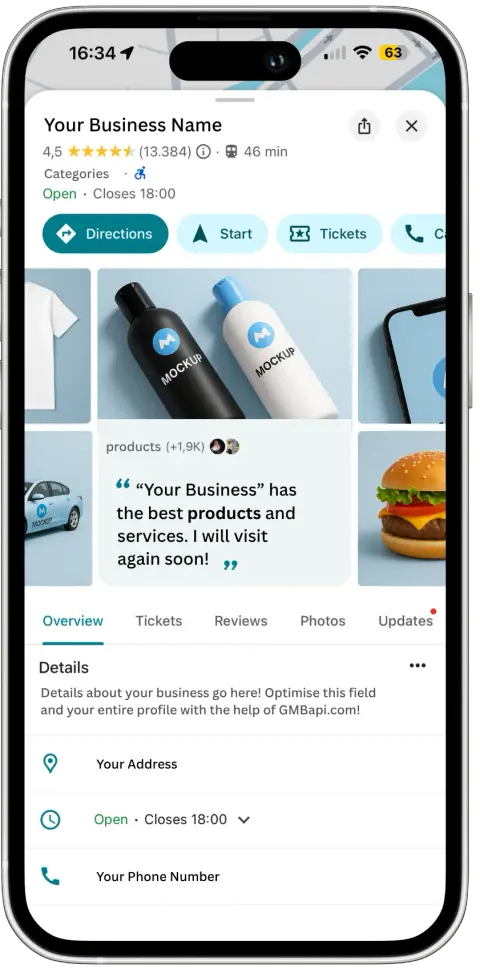
Think of Google Business reviews as your digital shop window. They aren't just feedback; they're public social proof that appears the moment a customer engages with your business. Whether someone is searching on Google Maps or Search, your reviews are often the very first interaction they have with your brand, before they've spoken to you, visited your website, or walked through your door.
A high-impact review is more than a score. It's a combination of:
Star Ratings
A 1 to 5-star snapshot of your performance.
Context
Specific comments that justify the score.
Visual Proof
Customer-uploaded photos that build authentic trust.
Attribute Ratings
Niche-specific data like atmosphere or service that helps Google categorise your expertise.
Why the importance of Google reviews is easy to underestimate
Reviews get treated as a hygiene task by a lot of marketers, something to glance at occasionally rather than a core part of local search strategy. That's a mistake. Reviews affect three things directly: how customers engage with you, whether they trust you, and where you show up at all.
1. Direct Customer Engagement
Reviews run both ways. They validate whether the information you provide about your business matches what customers actually experience. Responding to them turns a static profile into an active conversation with real evidence behind it.
BrightLocal's 2026 research found that 88% of consumers would use a business that responds to all its reviews, against just 47% for one that responds to none. That's not a marginal difference; it's close to double, and it's driven entirely by whether you show up in the conversation or not.
2. Trustworthiness
Your reputation is your strongest conversion tool. The same BrightLocal survey found that 97% of consumers now read reviews before choosing a local business, and 41% say they always do, up from 29% just a year earlier. That's not a slight majority. That's close to everyone.
Interestingly, a perfect 5.0 score isn't always the goal. Customers trust businesses more when they see a mix of positive and constructive feedback; it signals the reviews are genuine, not manufactured.
3. Visibility
Google's algorithm determines your rank in the local pack based on a specific hierarchy, and reviews affect every level of it:
Relevance
Review keywords help Google understand exactly what you do.
Distance
Proximity to the searcher. Reviews help maintain your ranking authority even as a user moves farther from your physical location.
Prominence
This is your digital reputation at scale. A high volume of recent reviews is the strongest signal of prominence available.
AI visibility acts as a check on whether your business is actually what it claims to be. Google increasingly uses AI to cross-reference your marketing claims against customer reality. If your website says "luxury" but your reviews consistently say "budget," AI detects the mismatch, and that sentiment gap can suppress your profile for high-value, intent-based searches.
Google's AI models scan reviews for specific keywords and entities: "dog-friendly," "fast wifi," "vegan options." This is how you surface in AI Overviews and Place Summaries, the results now sitting at the top of the search page.
“Google review count and review score factor into local search ranking. More reviews and positive ratings can improve your business' local ranking.”
The new frontier: review volume filters
For years, the industry treated quality and recency as the only things that mattered in reviews. Fresh feedback still fuels Google's AI descriptions and real-time sentiment analysis. But the game has changed. Google is now testing high-volume filters, "300+ reviews," "1,000+ reviews," directly in its interface.
This is a bigger shift than it looks. Review volume has moved from a ranking signal to a discovery gate. If a customer filters for "1,000+" and you have 999 reviews, you disappear from their results entirely, no matter how recent your last review was.
Volume gets you past the filter. Recency is what closes the deal after that. Once you clear the volume threshold, Google's AI models prioritise your most recent feedback when generating your Place Summary and AI Overview content.
How to scale your Google review collection
The most effective strategy is the simplest: ask. But to hit the newer 300+ and 1,000+ volume thresholds, you need to remove every barrier between your customer and the "Post" button.
Google provides a direct short link to your review section. You'll find this URL on the GMBapi.com app, under your location profile's Contact tab. Use it across three channels:
1. Digital & Direct Links
Email & Social
Embed this link in your team’s email footers and social media bios to capture organic feedback from your customers.
Post-Interaction SMS
Text messages have significantly higher open rates than email, making them the gold standard for a quick “review win” immediately after a service.
2. Physical Touchpoints (The "Tap-to-Review" Era)
In a physical location, you want to capture the peak buzz of a happy customer before they walk out the door.
NFC Cards
The ultimate frictionless tool. A customer simply taps their phone against a branded NFC card at your till or table, and your Google review pane opens instantly. No searching, no typing, just tapping.
QR Codes
Generate a QR code for your storefront, menus, or receipts to turn a physical interaction into a digital asset.
Training Staff
Technology is the tool, but your human team is the driver. Training your staff to request reviews ensures your physical touchpoints get used.
3. Review Solicitation Automation
If you find that manual review solicitation isn’t enough to move the needle, you can always integrate Automated Review Solicitation. This way, you can turn every customer interaction into a potential ranking signal.
The goal is to request a review every time a specific milestone is hit:
The Transaction
Trigger an SMS the moment a bill is settled at the table.
The Delivery
Send a follow-up email the second a package is marked as “Delivered.”
The Booking
Automate a request the moment a hotel stay or service appointment ends.
The less friction there is for the customer, the higher your conversion rate will be.
Read our page on Google Review Management for how this works at scale across multiple locations.
The compliance trap: why "fast" reviews are high risk
A sudden influx of 5-star ratings is tempting, but it usually triggers scrutiny rather than success. In 2026, Google's AI-driven spam detection isn't just looking for suspicious wording anymore; it's analysing review velocity and contextual patterns across millions of data points.
If Google's systems detect unnatural behaviour, they don't just remove the review; they can flag your entire profile for rating manipulation.
What Google's AI is watching for:
Velocity Spikes
Algorithms monitor your review frequency. If a business that usually receives 3 reviews a month suddenly gains 50 in a weekend, it’s an immediate red flag.
Physical & Digital Evidence
Google’s Vision AI can now identify photos of flyers or QR codes that explicitly offer incentives (discounts or freebies) in exchange for high ratings.
On-Site Pressure
Review gating, pressuring a customer to leave a review before they've even left the premises, is monitored directly.
Data Footprints
Reviews traced back to a single on-site Wi-Fi network or a cluster of new accounts with no history are often purged instantly.
What's prohibited outright:
Google’s policy is clear: any content created to manipulate engagement is a violation. This includes:
Prohibited Tactics (The "Don'ts")
Incentivised Feedback
Offering payments, discounts, or free products for a review, or for removing a negative one
Conflict of Interest
Reviews from employees, business owners, or people with close personal ties.
Fake Engagement
Content that is fabricated, posted from multiple accounts, or purchased.
The right way: genuine encouragement
You can and should ask for reviews. The focus needs to be on the experience, not the reward. Invite customers to share honest, detailed feedback, and as long as you're not shaping the rating or offering anything in exchange for the comment, you're building a compliant, sustainable reputation.
A "great service" review is fine, but generic, and it gives Google's AI models nothing to work with. Guide the customer with specific prompts instead:
“What specific service did we provide today?”
“Which team member helped you?”
“What was the specific outcome or highlight of your visit?”
These questions, embedded in your outreach, hand Google exactly the keywords, entities, and sentiment data its AI models are built to use, without ever telling the customer what to say.
Replying to Google reviews well
Getting the review is only half the job. Your reply is what actually builds the reputation.
Maximising Positive Feedback from Customers
Don’t ignore 5-star reviews. Replying confirms to both the customer and Google that your business is active and paying attention. A brief acknowledgement works, but a genuinely personalised response builds stronger recall and encourages future customers to leave their own.
Navigating the Negative Reviews
Negative reviews are inevitable, and Google knows it. A few 1-star ratings won’t tank your Local SEO efforts, but how you handle them will define your brand. Aim for a response within 7 days and follow this framework:
Acknowledge
Validate their experience without getting defensive.
Empathise
Apologise for the situation, even if you disagree with the facts.
Explain (don’t excuse)
Provide context without attacking.
Resolve privately
Invite them to a call or email to sort out the actual issue.
Replying to Google reviews well
Managing a high volume of reviews across multiple locations shouldn't be manual work. GMBapi's Review Management platform goes beyond standard management with unique features like tracking deleted reviews automatically, so you never lose hard-earned social proof to an aggressive spam filter, and handles replies with customisable AI, using dynamic variables like the customer's name and location to keep every response personal, even at scale.
Ready to grow your local authority? Start your free trial today and explore our reputation management features to see how we can scale your local presence.