 Michel van Luijtelaar
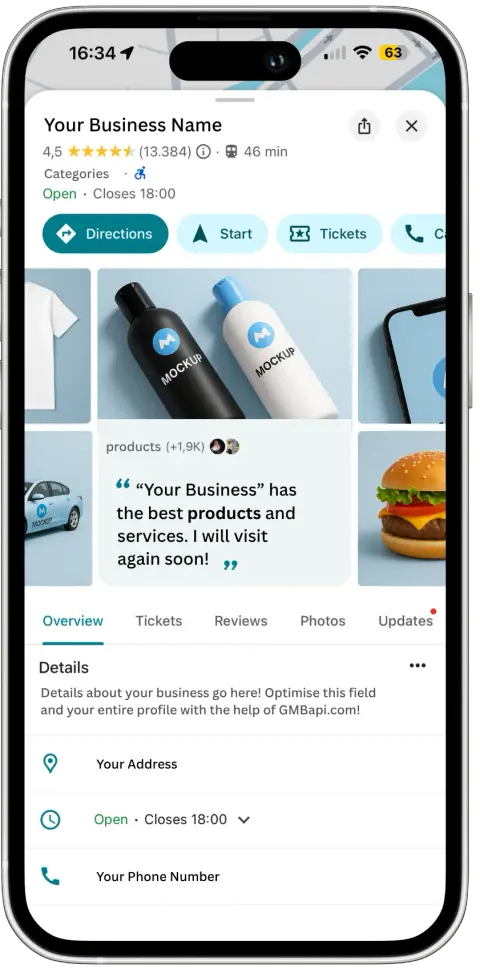
Verifying your business on Google Business Profile (GBP) is one of the most important steps you can take to strengthen your local online presence. It confirms that your business is legitimate, gives you full control of how it appears on Google Search and Maps, and helps protect it from unauthorised edits or spam.
This updated 2025 guide walks you through each verification step from setup to ongoing profile management and explains how to handle bulk verification if you manage multiple locations.
How to Verify My Business on Google?
Step 1: Sign In to Google Business Profiles
Go to Google Business Profile and sign in with your Google account.
If you haven’t claimed your business yet, search for your company name and select “Claim this business” to begin managing it.
Step 2: Add or Locate Your Listing
If your business doesn’t appear automatically, click “Add your business to Google” and enter all relevant details:
- Business name
- Address or service area
- Phone number
- Website
- Primary and secondary categories
- Business hours
Make sure the information matches what’s on your website and other directories.
Step 3: Start the Verification Process
Once your profile is set up, click “Get verified” to begin.
Google will assign you one or more verification options based on your business type, location, and activity.
Step 4: Verification
Google offers several verification methods, which are assigned at random, including:
- Video Verification: The most common method in 2025. You’ll be asked to record a short video showing your business location, signage, and any equipment that proves your business operates there. You can start on a desktop and scan a QR code to finish on mobile.
- Phone Verification: Google calls the phone number on your profile with a verification code. Enter this code in your GBP dashboard.
- Email Verification: Some businesses receive an email with a verification link or code sent to the email address associated with your GBP account.
- Mail/Postcard Verification (Less Common): In rare cases, Google sends a postcard to your business address containing a code.
Step 5: Enter or Submit Your Verification
If you received a code by phone, email, or mail, enter it in your dashboard and click “Submit.”
If you completed a video verification, Google will review your submission and email you when it’s approved.
Step 6: Verify ownership (if necessary)
Occasionally, Google may ask for additional proof of business ownership. Be ready to submit documents like:
- Utility bills or business licenses showing your name and address
- Photos of signage or interior branding
- Proof of domain ownership
Step 7: Get Verified and Unlock Full Access
Once verified, your Google Business Profile will be fully active. You’ll gain access to insights, messaging, post creation, product listings, and other tools to attract local customers.
Step 8: Keep Your Information Accurate
Google values active, trustworthy profiles. Regularly:
- Update business hours, especially during holidays
- Respond to customer reviews
- Add new photos or products
- Monitor “suggested edits” from users
Bulk Verification for Multi-Location Businesses
If your company has 10 or more locations, you can request bulk verification to save time.
To do this:
- Ensure all locations use the same business name and domain-based email (e.g., @vakgarage.nl).
- Add all locations to your account as unverified listings.
- Visit the Bulk Verification Request Form.
- Submit your business details, including the number of locations and a link to your location group.
Google will review your request and contact you for additional documentation if needed.
Why Verification Matters
Verification isn’t just a formality; it protects your brand, prevents fake edits, and ensures your business appears in local packs and Google Maps results where customers are ready to buy. Without it, you can’t manage reviews, photos, or posts effectively.
GMBapi - Your Multi-Location Local SEO Solution
Managing multiple Google Business Profiles manually can be time-consuming, but GMBapi.com makes it simple. The platform centralises management across all your locations, provides AI-powered review and reputation monitoring, automates local content while tracking performance, and allows bulk syncing with major citation networks. Start your free GMBapi.com trial today and take control of your local visibility with precision and ease.
FAQ About Google Business Verification
Verification times vary by method. Phone and email verification are usually instant, video verification can take a week for review, and mail/postcard verification may take up to 14 days.
Yes. Google allows service-area businesses and home-based businesses to verify. You may use video verification or specify a service area instead of showing a storefront.
Double-check you entered the code correctly and ensure it hasn’t expired. If issues persist, request a new verification method or contact Google support for assistance.
Yes. Once your business is verified, you can add managers or admins with different access levels, so your team can help manage your profile without sharing your Google account login. With GMBapi.com, you can take this further by segmenting locations and assigning users to specific segments, giving them control only over the locations in their assigned group.
Regularly, at least twice a month. Update business hours, add new photos or products, respond to reviews, and monitor suggested edits to keep your profile accurate and trustworthy.
Bulk verification is for businesses with 10 or more locations. It allows you to verify all locations at once, streamlining management and saving time.
Sometimes. Google generally assigns the most appropriate verification method, but you may request a different method if the assigned option isn’t feasible. You will have to contact Google Support about using another verification method.
You’ll need to provide supporting documents such as utility bills, business licenses, signage photos, or proof of domain ownership. Having these ready speeds up the process.
GMBapi.com centralises multi-location management, automates content, monitors reviews, and tracks performance, making local SEO easier and more efficient. GMBapi.com cannot verify or submit for bulk verification on your behalf.