How to Post on Google Business Profile in 2025: Best Practices & Pro Tips

With Google rolling out new features like photo likes, AI-powered content displays, and story-style engagement formats, Google Business Profile (GBP) posts are now a high-impact part of your local SEO toolkit.
Here’s how to make your GBP posts shine in 2025:
Why GBP Posts Matter More Than Ever
Boost Visibility & Engagement
Leverage New Features
Google now supports:
Photo likes from users
User-generated content that appears in “story-style” formats
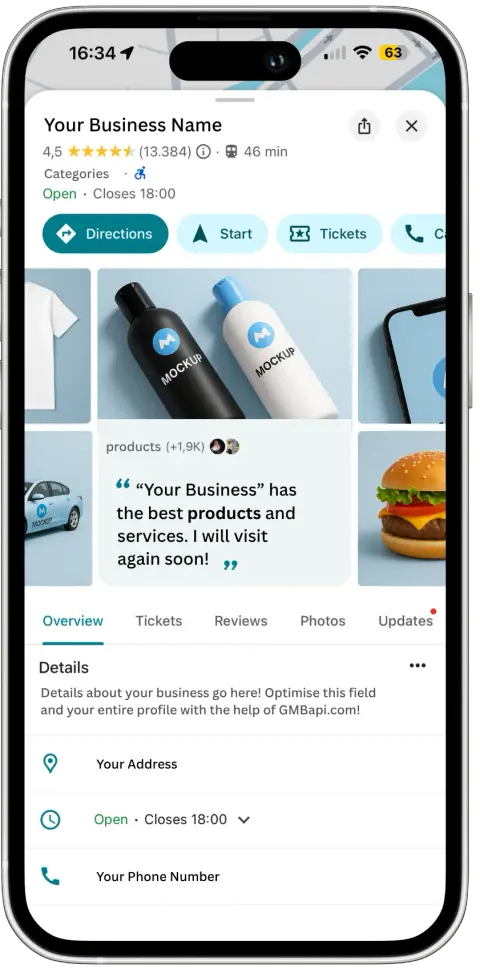
A more dynamic layout on mobile search, maps, and business profiles
What are “Story-style formats”?
These are Google’s answer to social media-like interaction, featuring:
Tappable image or video cards, users can swipe through
Short, engaging text snippets
Visible likes on user-submitted photos
A mobile-first, carousel-style layout for posts
In practice: Your posts now show up in more immersive, scrollable formats, especially on mobile. That means visual storytelling matters more than ever.
Image & Video Tips
Best resolution
Use 1080 × 1080 pixels for images, and videos up to 30 seconds or 100 MB.
Use real imagery
Show your people, products, and places – authentic content performs best. Google reports that businesses with photos get:
42% more directions requests
35% more clicks to their website (source: Whitespark)
Update weekly: Aim for at least one post per week to keep your profile fresh and prominent.
Do Posts Still Expire After 7 Days
Sort of. Here’s what you need to know:
Type | What Happens After 7 Days? |
|---|---|
“What’s New” Posts | Still visible, but lose top placement - older posts are tucked under “View all updates” |
Event Posts | Stay live until the event ends |
Offer Posts | Stay active until the offer expires |
Product Posts | Remain live until removed |
Crafting Effective GBP Posts
Use Clear CTAs
Buttons like “Book,” “Call now,” “Order online,” or “Learn more” guide users toward conversion.
Keep it short
Stick to 150–300 characters. Start strong with your value message.
Use relevant keywords
Naturally include key phrases like “free consultations” or “emergency repairs” to improve relevance.
No hashtags
They’re not used by Google. Emojis are fine – if they suit your brand voice.
Engagement & User Interaction
Like customer photos
Google now shows visible likes on images, which encourages interaction and shows an active profile.
Respond to reviews & Q&A
Fast, helpful replies contribute to your profile strength and trustworthiness.
Encourage photo uploads
Happy customers = great user-generated content. These photos can show up in the new story-style layout.
Managing Volume & Frequency
Weekly cadence
Post at least once a week to maintain visibility. More frequent posts may be beneficial during promotions or high-traffic seasons.
Time it right
Schedule around events, holidays, and promotions for maximum relevance.
Use tools for scale
With GMBapi.com, you can bulk-schedule and manage posts across multiple locations. Perfect for franchises and multi-location businesses.
Track What Works
Use UTM tags
Track clicks and conversions from GBP posts in Google Analytics or other tools.
Review GBP Insights
Monitor post views, clicks, calls, and direction requests to measure engagement.
Adapt based on performance
If product or event posts are generating more interactions, do more of them! New features like QR review codes, WhatsApp links, or Google highlights can also be integrated as available.
GBP Post Best Practices Checklist
Task | Why It Matters |
|---|---|
📷 Quality image (1080×1080) | Increases post engagement |
✏️ Short caption + CTA | Boosts clicks and conversions |
📅 Weekly posts | Maintains freshness and visibility |
🔗 Track performance | Understand ROI of each post |
💬 Engage with user content | Builds trust and helps GBP visibility |
Final Thoughts
With GBP evolving into a more interactive, AI-powered tool, complete with photo likes, mobile-first story formats, and enhanced user feedback mechanisms, your posts can now drive real business results.
If you’d like to schedule, bulk-manage, or analyse your GBP posts across locations, GMBapi.com is built to make that easy.
Let’s keep your business looking its best – everywhere it appears on Google.
FAQ About GBP Posts and Best Practices
Wondering why your Google Event post isn’t showing up on mobile search when it should?
Google’s event post system is smarter than we think but only if you give it the right details.
🔍 Don’t overlook the basics:
If your post just says “Happy Hour from 4PM to 6PM,” it likely won’t be featured.
✅ Instead, say: “Happy Hour every Monday through Thursday from 4PM to 6PM.”
Google parses the days of the week to determine when your post should appear in search results—like the featured post shown here. Skip that detail, and it may not display at all.
📅 Pro tip:You don’t need to reschedule this post weekly. Set it for the entire month and it will keep showing on the right days.
💡Bonus insight:Google can also pull in event data from your social media if the event is listed properly with consistent details. Even if you don’t post directly to your Google Business Profile, your event may still show up. If the information matches.
This feature currently only displays on mobile for branded searches.