GMBapi.com

How to Respond to a Google Review?


How to Respond to a Google Review?
Last updated on November 12, 2024

How to Respond to a Google Review
Responding to Google reviews is vital to managing your online reputation and building trust with customers. Regardless of whether the feedback is positive or negative, responding promptly and professionally demonstrates your commitment to customer satisfaction. In this guide, we will provide you with a step-by-step approach to effectively respond to Google reviews.

How to Respond to a Google Business Review?

Step 1: Access your Google Business Profiles dashboard
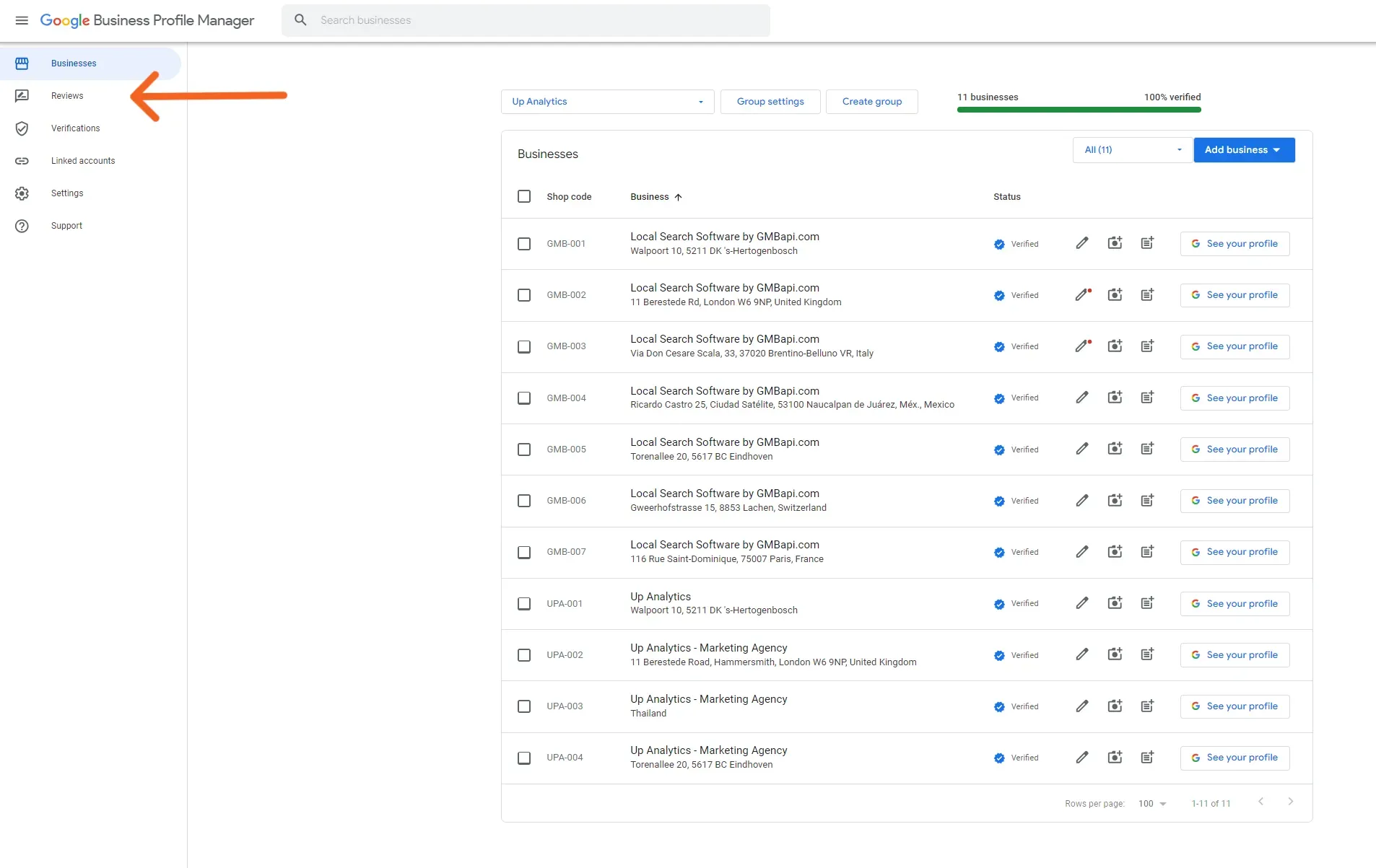
To respond to Google reviews, login to your Google My Business account using your credentials. Once logged in, navigate to the “Reviews” section of your dashboard.

Google Business Profiles Dashboard - Reviews

Step 2: Locate the review you want to respond to

Within the “Reviews” section, you’ll find a list of all the reviews your business has received. Scroll through the list to locate the specific review you wish to respond to. Click on the review to open it.


Step 3: Read the review carefully

Before crafting your response, take the time to read the review thoroughly. Understand the customer’s feedback, whether it’s positive, negative, or neutral, and pay attention to specific details mentioned.


Step 4: Click on the “respond” button

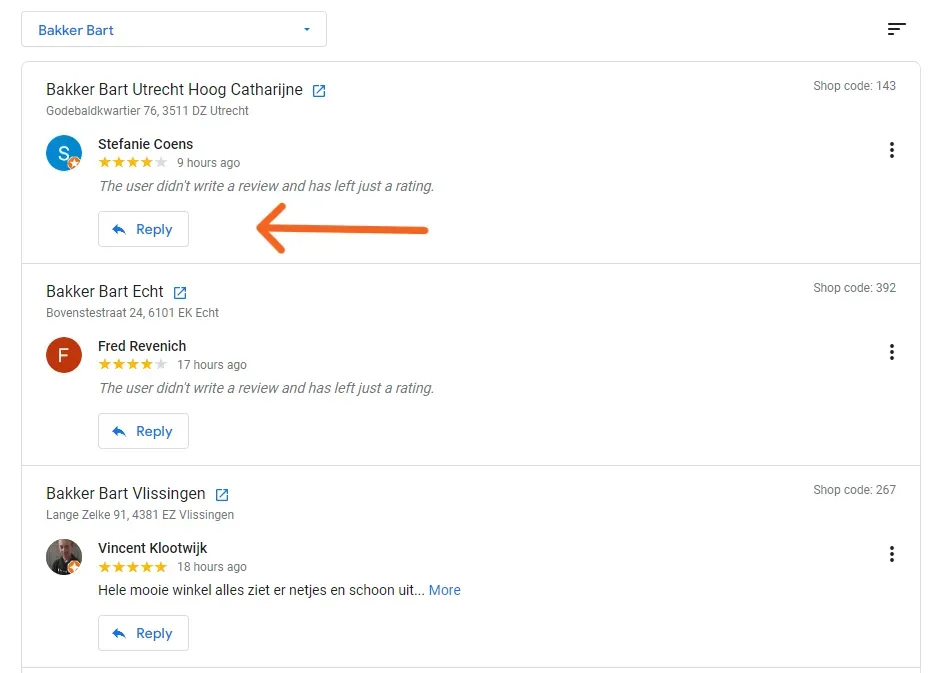
Below the review, you’ll see an option to “Reply” Click on this button to start drafting your response.

Reply to Google Review

Step 5: Craft your response

When composing your response, keep the following tips in mind:

  • Be timely: Respond to reviews promptly, ideally within 24-48 hours.
  • Be personalised: Address the reviewer by name if possible and tailor your response to their feedback.
  • Be gracious: Express gratitude for positive reviews and acknowledge the customer’s experience.
  • Be empathetic: Show understanding and empathy towards any concerns raised in negative reviews.
  • Be solution-oriented: Offer solutions or remedies to address any issues raised in the review.
  • Be professional: Maintain a professional tone and avoid engaging in arguments or conflicts.
  • Be concise: Keep your response clear and concise, focusing on addressing the main points of the review.


Step 6: Preview and edit your response

Before submitting your response, preview it to check for any typos or grammatical errors. Make any necessary edits to refine your message.


Step 7: Submit your response

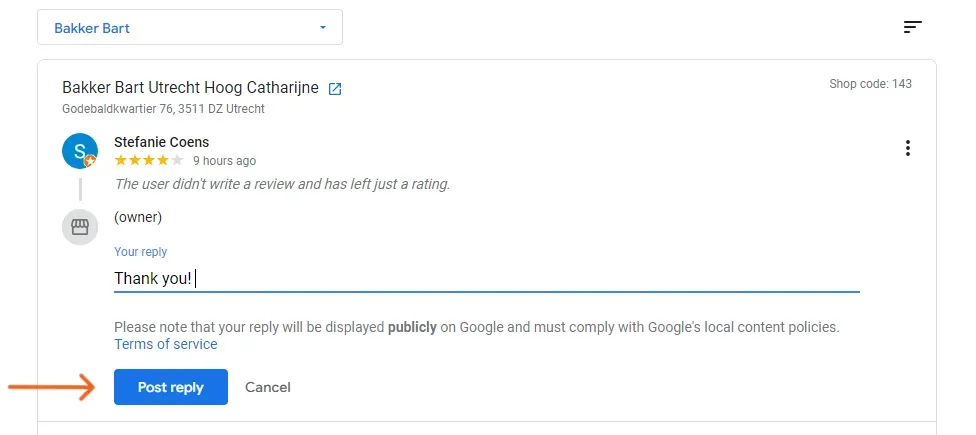
Once you are satisfied with your response, click on the “Post Reply” button to publish it. Your response will be publicly visible alongside the original review.

Reply to Google Review - Post Reply

Step 8: Monitor and follow up

After posting your response, continue monitoring your Google reviews regularly. If necessary, follow up with customers to resolve any outstanding issues or to express gratitude for their feedback.

Also read the page from Google about read & reply to reviews on Google

Responding to Google Reviews

Responding to Google reviews is crucial to managing your online reputation and fostering positive relationships with customers. By following this guide and adhering to best practices, you can effectively engage with reviewers, showcase your commitment to customer satisfaction, and enhance your business’s online credibility. Remember to approach each review with professionalism, empathy, and a willingness to address customer concerns.

GMBapi for Google Review Management

For streamlined Google review management, consider trying our Google review management software included in the standard package of our Local Search tool – GMBapi.com. Designed to minimise time investment, our Google review management feature allows you to effortlessly respond to any Google reviews or inquiries using AI-generated suggestions or customisable templates. Begin your free trial now and simplify the management of your organisation’s online reputation.


Feel free to contact us if you need any further assistance with your Google Business Profiles.

More news, trends, and how to guides

Google’s New Moderation Layer: Review Reply Status

maplabs alternative for local seo

Top Local Brand Manager Alternatives for Scalable Local SEO

GBP Suspension Manual

The Google Business Profile Suspension Manual: Recovery & Risk Mitigation

Start growing with GMBapi.com

Leverage AI to manage reviews, bulk publish content while ensuring consistency across all your local platforms. Stay ahead by monitoring competitors & showcasing what makes you stand out.
GMB Profile on Mobile

Our Transparent Pricing

How Our Clients Keep Winning

Check out our tool in action

Get started on Local SEO today with a free demo from one of our experts

Trusted By
Mercedes Benz Logo
hunkemoller Logo 1536x221
randstad logo 1536x321
parkbee logo
pets place boeren bond logo
McDonalds logo