 Michel van Luijtelaar
Online-conversion Local Ads is a new cross-Google dedicated campaign subtype. Businesses can use this to promote products or services relevant to specific locations. You can advertise your business (or physical location) in the umfeld of your brand, directly on competitor Google Business Profile accounts or claim the space on your listing to protect the customer journey.
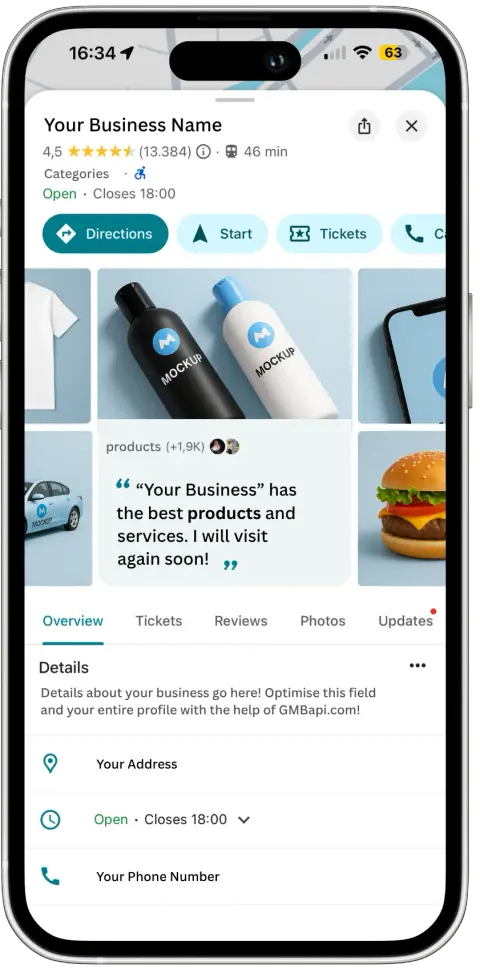
If you sell Yoga mats, why not advertise on Yoga Studios? When you have a competitive offer, you now have the option to advertise on competitor locations within a certain range from your stores. This is a big new ad format to consider for omnichannel businesses savvy enough to create feeds of relevant businesses (they would want to advertise on as pictured below).
Why use Online-conversion Local Ads?
With OLA, these businesses can now target their ads to specific locations, which offers the following benefits:
Google visibility
Ads show in relevant local contexts across Google, this includes Search and Maps
Location-specific ads
Customisation possibilities for Ad copy and landing page
Simplicity
Leverages automated Smart Bidding to meet performance goals
Scale
manage ads for thousands of locations
Per-location reporting
Advertisers can view the performance for each entry
Also read: Google guidelines about Local Search ads
Where are OLAs shown?
1. When users are searching for a specific location, ads show on Place Pages across both Search and Maps.
2. When users search and click on a local result, Ads also show on Search and Maps
3. Text ads for relevant local queries.
IMPORTANT TO NOTE :Before setting up or creating a campaign a feed must be created and uploaded into the account.
Online-conversion Local Ads feed
Advertisers have to create an Online-conversion Local Ads feed to specify the content of the ads and the specific location that each ad applies to. See the specifications below:
Column Name | Required? | Description | Validations |
|---|---|---|---|
Entry ID | Yes | Unique ID representing an entry in the feed. Two entries should NOT have the same “Entry ID” | String, up to 100 characters. |
Label | Yes, if there are more than 8K entries | Labels can be used to specify a subset of the feed to be used in a campaign. Note: Labels are required if the feed has more than 8,000 entries. | Up to 50 characters per label, up to 3 labels separated by; |
Headline | Yes | Headline, for the ad creative. | Text, up to 30 characters |
Description | Yes | Description, for the ad creative. | Text, up to 60 characters |
Call To Action | Yes | Call-to-action for the ad creative. | UText, up to 11 characters |
Image Url | Yes | URL of the image to show in the ad creative | Valid URL that links to an image (320x320 pixels, max 5MB) |
Final Url | Yes | Landing page URL following an ad click | Same validation as “Final URLs” in-text ads |
Final Mobile Url | No, optional | Mobile-specific landing page URL, if required | Same validation as “Mobile final URL” in-text ads |
Location Name | Yes | Name of the location on which the ad should be shown Note: Location Name in feed should match what’s seen in Google | Text, up to 100 characters |
Full Address | Yes | Full address of the location on which the ad should be shown (used for location matching) | Text, up to 500 characters |
Latitude | No, optional | Latitude of the location on which the ad should be shown (including this may improve location-matching) | -180 to 180, represents the latitude of the location |
Longitude | No, optional | Longitude of the location on which the ad should be shown (including this may improve location-matching) | -180 to 180, represents the longitude of the location |
Setting up campaigns
When the feed is ready and uploaded, follow these steps to set up the OLA campaign.
In the “New campaign” creation page, select “Create a campaign without a goal’s guidance”
Select “Local” and continue
Select “Online conversion local campaign”, select a previously created feed, enter an optional label (see here for usage of labels) and “Continue”.
Enter a name for the campaign, select language targeting, budget and bids to complete the setup.
Work on your OLA Feed
Online-conversion Local Ads is a new tool to help you work on your local visibility. At GMBapi.com we can create feeds for advertisers that use our Local Search product. Once we have access to your Google My Business it is easy for us to create feeds that fit your marketing strategy and align with your geographical presence.
Work on your local visibility
Before starting with this advertising option, working on the basics of your Google Business Profiles is essential. For multi-location businesses this involves:
Up-to-date listing information
Reputation management
Posting Strategy
Download Chain Keyword Impression report
A/B testing
That’s where GMBapi can help. Manage your Google Business Profile listings more effectively with our platform. Start your free trail today.